Many WordPress site owners run Baidu Union, Google AdSense, or other ad networks on their sites to earn a little income and help cover server costs. If you want those ads to appear inside your post content rather than only in the sidebar or footer, there are a few straightforward ways to do it.
Use a plugin to insert ads between paragraphs
If you prefer a simple setup from the dashboard, a plugin is the easiest option. A practical choice is Insert Post Ads. After installing it from the WordPress admin area, you can add your ad code directly in the backend and choose where it should appear between paragraphs.
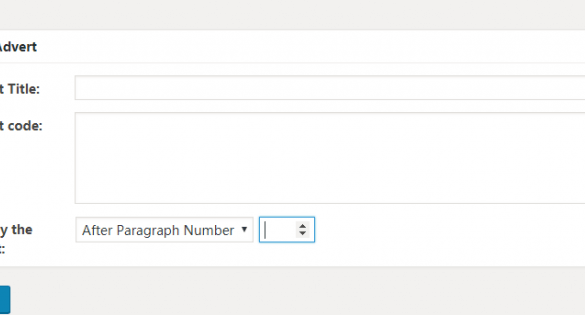
This approach is convenient if you want a visual setup and do not want to edit theme files.
Insert ad code with a custom function
Placing ad code inside post content is actually a very small feature, so some people would rather avoid using another plugin for it. Too many plugins can make a site feel bloated, and for something this simple, adding a small function to your theme can be a cleaner solution.
The idea is to hook into the_content and inject your ad after a specific paragraph. You only need to replace the ad code and adjust the paragraph number to match the position you want, then paste the code into your current theme's functions.php file.
Here is the example code:
/* * WordPress 在文章内容中间插入广告 */ //在文章内容的第二段后面插入广告 add_filter( 'the_content', 'prefix_insert_post_ads' ); function prefix_insert_post_ads( $content ) { $ad_code = '<div>这里是广告代码</div>'; if ( is_single() && ! is_admin() ) { // 修改 3 这个段落数 return prefix_insert_after_paragraph( $ad_code, 3, $content ); } return $content; } // 插入广告所需的功能代码 function prefix_insert_after_paragraph( $insertion, $paragraph_id, $content ) { $closing_p = '</p>'; $paragraphs = explode( $closing_p, $content ); foreach ($paragraphs as $index => $paragraph) { if ( trim( $paragraph ) ) { $paragraphs[$index] .= $closing_p; } if ( $paragraph_id == $index + 1 ) { $paragraphs[$index] .= $insertion; } } return implode( '', $paragraphs ); }
With this method, you can place your ad in a fixed position inside every single post.
Manually place ads only where you want them
The first two methods automatically insert ads after the same paragraph in every post. That works well in many cases, but sometimes manual placement is more practical.
For example:
- You may not want an in-content ad in certain posts at all. A personal post or a family update might be a good example.
- You may want to place ads after multiple different paragraphs in a single article instead of using only one fixed position.
In that case, using a shortcode gives you more control.
1. Add an ad shortcode, with separate output for mobile devices
You can place the following shortcode function in functions.php. It checks whether the visitor is on mobile and serves a different ad size accordingly.
//广告短代码 1+function adbox($atts, $content=null, $code="") { if (!wp_is_mobile()) { $return .= '<hr />'; $return .= '<div align=center>'; $return .= '<script async src="//pagead2.googlesyndication.com/pagead/js/adsbygoogle.js"></script>'; $return .= '<ins class="adsbygoogle"'; $return .= ' style="display:inline-block;width:728px;height:90px"'; $return .= ' data-ad-client="ca-pub-XXXXXXXXXX"'; $return .= ' data-ad-slot="8133911029"></ins>'; $return .= '<script>'; $return .= '(adsbygoogle = window.adsbygoogle || []).push({});'; $return .= '</script>'; $return .= '</div>'; $return .= '<hr />'; return $return; } else { $return .= '<hr />'; $return .= '<div align=center>'; $return .= '<script async src="//pagead2.googlesyndication.com/pagead/js/adsbygoogle.js"></script>'; $return .= '<ins class="adsbygoogle"'; $return .= ' style="display:inline-block;width:300px;height:250px"'; $return .= ' data-ad-client="ca-pub-XXXXXXXXXX"'; $return .= ' data-ad-slot="5804441003"></ins>'; $return .= '<script>'; $return .= '(adsbygoogle = window.adsbygoogle || []).push({});'; $return .= '</script>'; $return .= '</div>'; $return .= '<hr />'; return $return; } }add_shortcode('ad' , 'adbox' );
2. Insert the shortcode wherever you want the ad to appear
Add the following shortcode at the exact position where you want the ad displayed. Replace the parentheses with square brackets:
(ad)(/ad)
This manual method is especially useful when different posts need different ad layouts. You can skip ads entirely in some articles, or place several ad blocks throughout a long post without being limited to one fixed paragraph position.