Polling and long-polling have their place, but WebSocket takes a different route. It lets untrusted client code control a remote host in a controlled network environment. The protocol has two distinct parts: a handshake and data transfer. The handshake borrows HTTP headers, then the connection upgrades to a TCP-based message framing layer. Compared with XHR-based iframe streaming and long polling, this gives you a cleaner pipe once the handshake is done.
The WebSocket protocol
Overview
The WebSocket protocol allows untrusted client code to control a remote host in a controlled network environment. It consists of a handshake and a basic message framing layer over TCP. In plain terms, after the handshake response, you get a secure information channel. That is a clear improvement over the XMLHttpRequest-based iframe data stream and long polling described earlier. The protocol covers two areas: handshake connection and data transfer.
Handshake
The handshake itself is simple, like greeting someone you know on the street.
Client: Hey buddy, got a light? (offers a cigarette) Server: Sure, here you go~ (lights it) Client: A match? That works too! (cigarette lit, verification complete)
The client reaches out first:
GET /chat HTTP/1.1
Host: server.example.com
Upgrade: websocket
Connection: Upgrade
Sec-WebSocket-Key: dGhlIHNhbXBsZSBub25jZQ==
Origin: http://example.com
Sec-WebSocket-Protocol: chat, superchat
Sec-WebSocket-Version: 13
The client sends a Base64-encoded key, the Sec-WebSocket-Key. After seeing the client's greeting, the server quietly tells the client it has understood and greets back:
HTTP/1.1 101 Switching Protocols
Upgrade: websocket
Connection: Upgrade
Sec-WebSocket-Accept: s3pPLMBiTxaQ9kYGzzhZRbK+xOo=
Sec-WebSocket-Protocol: chat
The server returns Sec-WebSocket-Accept, which is generated in a specific way. The algorithm is:
mask = "258EAFA5-E914-47DA-95CA-C5AB0DC85B11";
accept = base64( sha1( key + mask ) );
The key and mask are concatenated, hashed with SHA-1, and then Base64-encoded. Step by step:
1. t = "GhlIHNhbXBsZSBub25jZQ==" + "258EAFA5-E914-47DA-95CA-C5AB0DC85B11" -> "GhlIHNhbXBsZSBub25jZQ==258EAFA5-E914-47DA-95CA-C5AB0DC85B11"
2. s = sha1(t) -> 0xb3 0x7a 0x4f 0x2c 0xc0 0x62 0x4f 0x16 0x90 0xf6 0x46 0x06 0xcf 0x38 0x59 0x45 0xb2 0xbe 0xc4 0xea
3. base64(s) -> "s3pPLMBiTxaQ9kYGzzhZRbK+xOo="
The HTTP status code from the server is 101. If it is not 101, the handshake failed from the start.
Here is a small demo to shake hands with the server:
var crypto = require('crypto');
require('net').createServer(function(o){
  var key;
  o.on('data',function(e){
    if(!key){
      // handshake
      // response part, code omitted for now
      console.log(e.toString());
    }else{
    };
  });
}).listen(8000);
Client code:
var ws=new WebSocket("ws://127.0.0.1:8000");
ws.onerror=function(e){
  console.log(e);
};
The code above is incomplete, of course. The point is to show the client greeting the server during the handshake. In the console you can see:
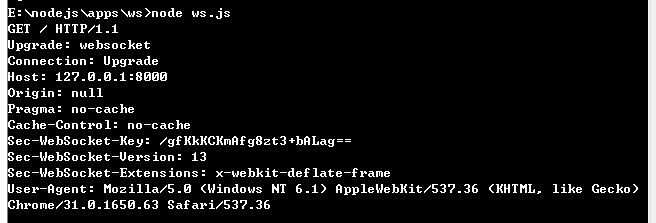
That looks familiar. It is simply an HTTP request, and you can also see it in the browser's Network panel:
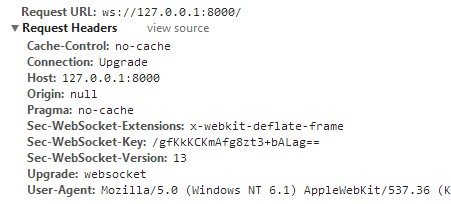
But the WebSocket protocol is not HTTP. It borrows HTTP headers during the initial verification. Once the connection is established, communication is no longer HTTP. If you try to capture it with Fiddler2, you will not get it. The later communication is based on a TCP connection.
For the server to communicate successfully, it must respond. Here is the server:
// server program
var crypto = require('crypto');
var WS = '258EAFA5-E914-47DA-95CA-C5AB0DC85B11';
require('net').createServer(function(o){
  var key;
  o.on('data',function(e){
    if(!key){
      // handshake
      key = e.toString().match(/Sec-WebSocket-Key: (.+)/)[1];
      key = crypto.createHash('sha1').update(key + WS).digest('base64');
      o.write('HTTP/1.1 101 Switching Protocols\r\n');
      o.write('Upgrade: websocket\r\n');
      o.write('Connection: Upgrade\r\n');
      o.write('Sec-WebSocket-Accept: ' + key + '\r\n');
      o.write('\r\n');
    }else{
      console.log(e);
    };
  });
}).listen(8000);
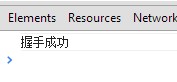
For the crypto module, check the official docs. The code above should be easy to follow. After the server responds, the client receives Sec-WebSocket-Accept and verifies it locally. If verification passes, the onopen function fires.
// client program
var ws=new WebSocket("ws://127.0.0.1:8000/");
ws.onopen=function(e){
  console.log("Handshake successful");
};
You can see:
Frame format
The official docs provide a structure diagram:
 0                   1                   2                   3
 0 1 2 3 4 5 6 7 8 9 0 1 2 3 4 5 6 7 8 9 0 1 2 3 4 5 6 7 8 9 0 1
+-+-+-+-+-------+-+-------------+-------------------------------+
|F|R|R|R| opcode|M| Payload len |    Extended payload length    |
|I|S|S|S|  (4)  |A|     (7)     |             (16/64)           |
|N|V|V|V|       |S|             |   (if payload len==126/127)   |
| |1|2|3|       |K|             |                               |
+-+-+-+-+-------+-+-------------+ - - - - - - - - - - - - - - - +
|     Extended payload length continued, if payload len == 127  |
+ - - - - - - - - - - - - - - - +-------------------------------+
|                               |Masking-key, if MASK set to 1  |
+-------------------------------+-------------------------------+
| Masking-key (continued)       |          Payload Data         |
+-------------------------------- - - - - - - - - - - - - - - - +
:                     Payload Data continued ...                :
+ - - - - - - - - - - - - - - - - - - - - - - - - - - - - - - - +
|                     Payload Data continued ...                |
+---------------------------------------------------------------+
At first glance this may look painful, but anyone who has taken a computer networking course should not find it too strange. A data transfer protocol needs to define byte lengths and meanings.
FIN 1bit  indicates the final frame of a message, a flag
RSV 1-3 1bit each, reserved for future use, default 0
Opcode 4bit frame type, details below
Mask 1bit mask, whether data is encrypted, must default to 1 (annoying)
Payload 7bit data length
Masking-key 1 or 4 bit mask
Payload data (x + y) bytes data
Extension data x bytes extension data
Application data y bytes application data
Every frame follows this protocol rule. Once you know the protocol, parsing is not too hard. The following code is a common implementation.
Parsing and encoding data frames
Frame parsing code:
function decodeDataFrame(e){
  var i=0,j,s,frame={
    // parse the basic data of the first two bytes
    FIN:e[i]>>7,Opcode:e[i++]&15,Mask:e[i]>>7,
    PayloadLength:e[i++]&0x7F
  };
  // handle special lengths 126 and 127
  if(frame.PayloadLength==126) frame.length=(e[i++]<<8)+e[i++];
  if(frame.PayloadLength==127) i+=4, // length is usually a 4-byte integer, first four bytes are usually reserved for long integer
    frame.length=(e[i++]<<24)+(e[i++]<<16)+(e[i++]<<8)+e[i++];
  // check whether mask is used
  if(frame.Mask){
    // get masking key
    frame.MaskingKey=[e[i++],e[i++],e[i++],e[i++]];
    // XOR data with mask
    for(j=0,s=[];j<frame.PayloadLength;j++) s.push(e[i+j]^frame.MaskingKey[j%4]);
  }else s=e.slice(i,frame.PayloadLength); // otherwise use data directly
  // convert array to buffer
  s=new Buffer(s);
  // convert buffer to string if necessary
  if(frame.Opcode==1)s=s.toString();
  // set payload data
  frame.PayloadData=s;
  // return frame
  return frame;
}
Frame encoding:
// NodeJS
function encodeDataFrame(e){
  var s=[],o=new Buffer(e.PayloadData),l=o.length;
  // first byte
  s.push((e.FIN<<7)+e.Opcode);
  // second byte, decide length and put the following length bytes
  // never use mask
  if(l<126)s.push(l);
  else if(l<0x10000)s.push(126,(l&0xFF00)>>2,l&0xFF);
  else s.push(
    127,
    0,0,0,0, // 8-byte data, first 4 bytes usually unused, leave blank
    (l&0xFF000000)>>6,(l&0xFF0000)>>4,(l&0xFF00)>>2,l&0xFF
  );
  // return a combined buffer of header and data
  return Buffer.concat([new Buffer(s),o]);
}
Some readers may not be clear about which data to parse. The parsing task is mainly handled by the server. The data sent by the client is in binary stream form, for example:
var ws = new WebSocket("ws://127.0.0.1:8000/");
ws.onopen = function(){
  ws.send("握手成功");
};
The server receives something like this:

A binary stream in Buffer format. When we output and parse this binary stream:
// server program
var crypto = require('crypto');
var WS = '258EAFA5-E914-47DA-95CA-C5AB0DC85B11';
require('net').createServer(function(o){
  var key;
  o.on('data',function(e){
    if(!key){
      // handshake
      key = e.toString().match(/Sec-WebSocket-Key: (.+)/)[1];
      key = crypto.createHash('sha1').update(key + WS).digest('base64');
      o.write('HTTP/1.1 101 Switching Protocols\r\n');
      o.write('Upgrade: websocket\r\n');
      o.write('Connection: Upgrade\r\n');
      o.write('Sec-WebSocket-Accept: ' + key + '\r\n');
      o.write('\r\n');
    }else{
      // parse the frame before output
      console.log(decodeDataFrame(e));
    };
  });
}).listen(8000);
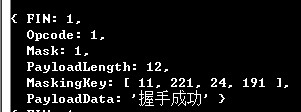
Then the output is a frame object with clear information:
Connection control
I left Opcode unexplained above. The official docs also provide a table:
<table> <thead> <tr> <th>Opcode</th> <th>Meaning</th> <th>Reference</th> </tr> </thead> <tbody> <tr> <td>0</td> <td>Continuation Frame</td> <td>RFC 6455</td> </tr> <tr> <td>1</td> <td>Text Frame</td> <td>RFC 6455</td> </tr> <tr> <td>2</td> <td>Binary Frame</td> <td>RFC 6455</td> </tr> <tr> <td>8</td> <td>Connection Close Frame</td> <td>RFC 6455</td> </tr> <tr> <td>9</td> <td>Ping Frame</td> <td>RFC 6455</td> </tr> <tr> <td>10</td> <td>Pong Frame</td> <td>RFC 6455</td> </tr> </tbody> </table>decodeDataFrame parses the data, and the resulting data format is:
{
  FIN: 1,
  Opcode: 1,
  Mask: 1,
  PayloadLength: 4,
  MaskingKey: [ 159, 18, 207, 93 ],
  PayLoadData: '握手成功'
}
You can check this against the table above. This frame is used to send text, so it is a text frame. Because the connection is based on TCP, directly closing the TCP connection closes the channel. But WebSocket is designed to be more considerate: before closing, it says goodbye. On the server side, you can check the frame's Opcode:
var frame=decodeDataFrame(e);
console.log(frame);
if(frame.Opcode==8){
  o.end(); // close the connection
}
The data (frames) exchanged between client and server have the same format. As long as the client sends ws.close(), the server will perform the operation above. Conversely, if the server sends the same close frame to the client:
o.write(encodeDataFrame({ FIN:1, Opcode:8, PayloadData:buf }));
The client will trigger the onclose function. This interaction is fairly orderly and less error-prone.
Things to watch
WebSocket URIs
Many people only know ws://text.com:8888, but a WebSocket protocol address can include a path and query.
ws-URI = "ws:" "//" host [ ":" port ] path [ "?" query ]
wss-URI = "wss:" "//" host [ ":" port ] path [ "?" query ]
If the wss protocol is used, the URI will connect securely. Here wss is case-insensitive.
The "extra" parts of the protocol (complaints)
The handshake request includes a Sec-WebSocket-Key field. Anyone with sharp eyes can immediately tell it is a WebSocket connection, and the encryption method for this field is fixed on the server. If someone wants to attack you, it is not too hard.
Then there is the MaskingKey mask. Since encryption is forced (Mask set to 1 means encrypted, and the encryption method is XOR between MaskingKey and PayLoadData), why should developers have to deal with it? Why not just encapsulate it internally?
Relationship with TCP and HTTP
The WebSocket protocol is a TCP-based protocol. It is related to HTTP only during the handshake (it sends an HTTP request), and that request is upgraded by the server to the WebSocket protocol. WebSocket uses port 80 as the default WebSocket connection port, while secure WebSocket runs on port 443.