MathMap is the GIMP plugin people often mention when they want to make Droste-effect images. I mostly worked through the Fedora side of the installation, and along the way ran into enough dependency and build issues that it made sense to write everything down.
There are three parts here:
- compiling and installing MathMap on Ubuntu
- a full Fedora installation log, including the problems encountered during compilation
- a shorter Fedora installation method if you just want to get it working
Ubuntu: compile from source
I did not have an Ubuntu machine available, so I could not verify whether there is now a simpler or faster way to install it there. What I can point to is an older 2013 build-from-source method:
http://tieba.baidu.com/p/2108398262
Fedora: full install log and troubleshooting
If all you want is the quick setup, skip ahead to the last section. This part is mainly a record of what happened during compilation and how each error was resolved.
Dependencies listed by MathMap
According to the INSTALL file, MathMap needs:
- The GIMP 2.4
- GSL (GNU Scientific Library), including GSL CBLAS
- fftw3
- libgtksourceview
- libjpeg, libpng, libgif (preferred) or libungif
- gettext
At first I assumed I only needed to install packages matching those names directly, so I started with yum search gsl and installed what looked relevant.
Installing dependencies
1. GSL
sudo yum install gsl
2. fftw3
MathMap needs fftw3 for Fourier transforms in C.
Download page: http://www.fftw.org/download.html
After extracting the source archive, build it like this:
cd fftw-3.3.4/
./configure
make
sudo make install
No errors here, so I moved on.
3. gtksourceview
A search for libgtksourceview turned up nothing at first, so I downloaded the source package instead.
Download location: http://ftp.acc.umu.se/pub/gnome/sources/gtksourceview/
I initially grabbed version 3.11, but it requested these packages:
No package 'glib-2.0' found
No package 'gio-2.0' found
No package 'gtk+-3.0' found
No package 'libxml-2.0' found
So I installed:
sudo yum install glib2-devel
su -c 'yum install gtk3-devel'
sudo yum install libxml2-devel
Then another problem appeared:
Requested ‘gtk+-3.0 >= 3.11.0′ but version of GTK+ is 3.10.6
GTK itself did not have a 3.11 release to match that requirement, so the practical fix was to stop using the newest gtksourceview tarball and instead build gtksourceview 3.10.
That worked.
4. intltool
Another issue during configure:
./configure: line 12598: intltool-update: command not found
checking for intltool >= 0.40... found
configure: error: Your intltool is too old. You need intltool 0.40 or later.
Fix:
sudo yum install intltool
This one took more time than it should have.
5. libjpeg, libpng, libgif
I did not install libgif at first, because searching for that exact name returned nothing.
sudo yum install libjpeg-turbo
sudo yum install libpng
Compiling MathMap
Once the basic environment looked ready, I started building MathMap itself.
One thing worth noting: there is no configure script in the source I was using, so the build starts directly with make.
Also, if make fails and you install or fix something before trying again, run make clean first and then rebuild.
Error 1: missing g++
Fedora package:
sudo yum install gcc-c++
Error 2: glib.h: No such file or directory
The error looked like this:
mathmap_common.c:40:18: fatal error: glib.h: No such file or directory
I found pygtk2-devel mentioned online and installed it, but that alone did not solve the problem. Installing gtksourceview2-devel finally fixed it. I cannot say for sure whether pygtk2-devel mattered, but I am recording it here anyway.
sudo yum install pygtk2-devel
sudo yum install gtksourceview2-devel
Error 3: gsl/gsl_matrix.h: No such file or directory
compiler.h:27:28: fatal error: gsl/gsl_matrix.h: No such file or directory
Fix:
sudo yum install gsl-devel
Error 4: libgimp/gimp.h: No such file or directory
userval.h:30:26: fatal error: libgimp/gimp.h: No such file or directory
Fix:
sudo yum install gimp-devel
Error 5: a pile of libpng pointer errors
This was the ugly one:
In file included from /usr/include/pngconf.h:72:0,
from /usr/include/png.h:445,
from rwpng.c:28:
rwpng.c: In function 'open_png_file_reading':
rwpng.c:61:29: error: dereferencing pointer to incomplete type
if (setjmp(data->png_ptr->jmpbuf))
^
rwpng.c:68:28: error: dereferencing pointer to incomplete type
*width = data->info_ptr->width;
^
rwpng.c:69:29: error: dereferencing pointer to incomplete type
*height = data->info_ptr->height;
^
rwpng.c:71:23: error: dereferencing pointer to incomplete type
if (data->info_ptr->bit_depth != 8 && data->info_ptr->bit_depth != 16)
^
rwpng.c:71:57: error: dereferencing pointer to incomplete type
if (data->info_ptr->bit_depth != 8 && data->info_ptr->bit_depth != 16)
^
rwpng.c:78:23: error: dereferencing pointer to incomplete type
if (data->info_ptr->color_type != PNG_COLOR_TYPE_RGB
^
rwpng.c:79:19: error: dereferencing pointer to incomplete type
&& data->info_ptr->color_type != PNG_COLOR_TYPE_RGB_ALPHA
^
......
After a lot of searching, this appeared to be a bug.
While checking available packages, I noticed just how many libpng versions existed, and people using different versions still did not seem to get a clean fix:
libpng12.i686 : Old version of libpng, needed to run old binaries
libpng10.i686 : Old version of libpng, needed to run old binaries
libpng10.x86_64 : Old version of libpng, needed to run old binaries
libpng10-devel.i686 : Development tools for version 1.0 of libpng
libpng10-devel.x86_64 : Development tools for version 1.0 of libpng
libpng12.x86_64 : Old version of libpng, needed to run old binaries
libpng12-devel.i686 : Development files for libpng 1.2
libpng12-devel.x86_64 : Development files for libpng 1.2
libpng15.i686 : Old version of libpng, needed to run old binaries
libpng15.x86_64 : Old version of libpng, needed to run old binaries
......
Useful discussion threads:
https://bugs.gentoo.org/show_bug.cgi?id=356625
https://groups.google.com/forum/#!msg/mathmap/Yl2UG2Lx12c/4GfLyXt7pzEJ
Those discussions suggested that the GitHub version might contain updates, so I downloaded MathMap again from:
https://github.com/schani/mathmap
At that point I simply used the website's Download button, which later turned out not to be the best way.
Error 6: clisp: Command not found
sudo yum install clisp
Error 7: No package 'fftw3' found
Package fftw3 was not found in the pkg-config search path.
Perhaps you should add the directory containing `fftw3.pc'
to the PKG_CONFIG_PATH environment variable
No package 'fftw3' found
Package fftw3 was not found in the pkg-config search path.
Perhaps you should add the directory containing `fftw3.pc'
to the PKG_CONFIG_PATH environment variable
No package 'fftw3' found
Even though fftw3 had already been installed, it was still not being found. Based on the previous pattern, I searched again and found the development package instead.
sudo yum install fftw-devel
Error 8: missing lisp-utils/utils.lisp
The build failed with:
A file with name lisp-utils/utils.lisp does not exist
clisp builtins.lisp
*** – LOAD: A file with name lisp-utils/utils.lisp does not exist
make: *** [compiler_types.h] Error 1
A discussion of the same issue: https://groups.google.com/forum/#!msg/mathmap/KjULqZ76bfI/cXIiJvt1kHAJ
The fix was to obtain MathMap with git and initialize submodules properly:
git clone https://github.com/schani/mathmap.git mathmap
Then enter the directory and run:
git submodule init && git submodule update
After a short wait, the missing files should be there.
Error 9: bison: Command not found
sudo yum install bison
Error 10: jpeglib.h: No such file or directory
rwjpeg.c:30:21: fatal error: jpeglib.h: No such file or directory
Fix:
sudo yum install libjpeg-turbo-devel
Error 11: gif_lib.h: No such file or directory
rwgif.c:29:21: fatal error: gif_lib.h: No such file or directory
I was ready to go look for libgif, but a search turned up giflib instead, and that did have a development package.
sudo yum install giflib-devel
At that point, the MathMap GIMP plugin finally built and installed successfully. I still was not very familiar with using it, but at least it was installed.
What this whole process taught me
A few patterns became very clear during the Fedora install:
- On Fedora, if a package is needed for compiling, the
-develpackage is often what actually matters. Installing that first can save a lot of trouble. - If a dependency is demanding a version that is too new, and you do not specifically need the latest release, trying a slightly older version can be the easiest fix.
- Many build failures come down to missing packages in the system environment. Unless necessary, it is usually better to install the proper dependencies than to start changing environment variables or system settings.
- If the Chinese error message is hard to search for, switching to English output helps. Using
export LANG=en_UScan make the error much easier to find information about. - If your package search returns nothing, try trimming the keyword and searching again.
- Most importantly: read the
READMEbefore installing. It can save a surprising amount of time.
Fedora quick install
The following commands worked on Fedora 20. On Fedora 22, replace yum with dnf. Also, on Fedora 22 there is no need to compile fftw manually; dnf install fftw should be enough. I did not verify whether Fedora 21 already included fftw in its repositories.
git clone https://github.com/schani/mathmap.git mathmap
cd mathmap
git submodule init && git submodule update

sudo yum -y groupinstall "Development Tools"
sudo yum -y install gcc-c++
sudo yum -y install gimp-devel gsl-devel wget

wget http://www.fftw.org/fftw-3.3.4.tar.gz
chmod +x fftw-3.3.4.tar.gz
tar -xzvf fftw-3.3.4.tar.gz
cd fftw-3.3.4/
./configure
make
sudo make install
cd ..

sudo yum -y install fftw-devel
sudo yum -y install gtksourceview2-devel
sudo yum -y install intltool gettext-devel
sudo yum -y install bison libtool
sudo yum -y install libjpeg-turbo-devel libpng-devel giflib-devel
sudo yum -y install clisp-devel bison-devel

make clean
make
sudo make install
Once installed, open it in GIMP through:
Filters → Generic → Mathmap → mathmap
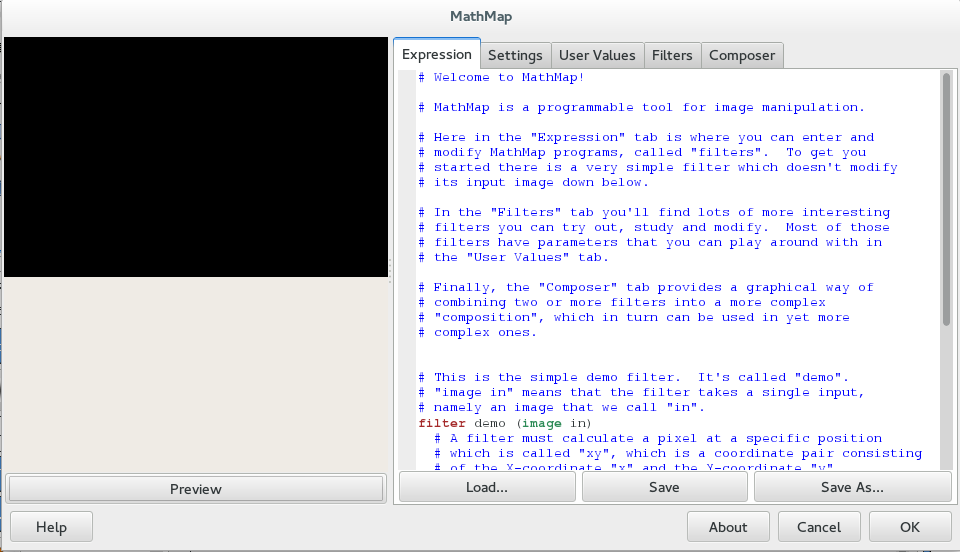
And then it is time to start experimenting with MathMap.