DHCP is fine until you need a predictable address. For a web service, I wanted the machine to keep the same IP, so I switched the CentOS network interface to a static configuration.
Start by entering the network-scripts directory:
cd /etc/sysconfig/network-scripts/
Run ls to see the files. The interface configuration is usually the one with a less tidy name—mine was something like ifcfg-enpls5—rather than a clearly descriptive filename. In the screenshot, the boxed file was the one I needed.

Open your own file with an editor. In the example below, the filename is ifcfg-eth0; replace it with the one that matches your system:
vi ifcfg-eth0 # Replace this with your own network configuration file

Find the line BOOTPROTO="dhcp" and change it to BOOTPROTO="static" so the interface stops asking DHCP for an address.
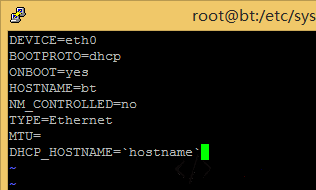
Then add the address details at the end of the file. Adjust IPADDR, NETMASK, and GATEWAY to match your network. If a DNS entry is already present in the file, you do not need to add another one.
IPADDR=192.168.0.3 NETMASK=255.255.255.0 GATEWAY=192.168.0.1 DNS1=114.114.114.114
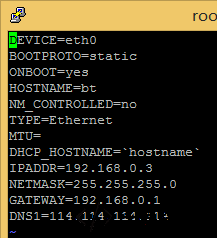
Restart the network service for the change to take effect:
service network restart
If you are connected over SSH, the session will drop once the IP changes. Connect again using the new address. An error may appear during the switch; you can ignore it and log in with the new IP.