When you press a key, why does a character appear on the monitor? On first contact, a computer can feel almost magical: you type, click, and things happen. Icons show up, windows open, text appears. Behind those visible actions, something has to coordinate the devices you touch and the devices that respond. That coordination is part of the operating system's input/output system.
Devices fall into broad groups
Common I/O devices can be roughly sorted into three categories:
- Block devices: each block has its own address, and information is stored in the corresponding block. A hard disk is the usual example.
- Character devices: no structure and no addressing; they pass a stream of bytes directly. A mouse fits here.
- Network devices: sockets, where the unit of data is a network packet.
Once devices are grouped, a practical problem appears. The CPU, the computer's brain, has to control these devices. It may need to tell a display to show a number, and it also has to receive input from devices such as a keyboard. With so many different devices, the CPU needs a kind of hand to help manage them. That hand is the device controller.
Device controllers and their registers
Keyboards, mice, monitors, and other devices do different jobs. To manage them in a uniform way, each device has a device controller. The controller hides the differences between devices.
A device controller has registers, and those registers are how it communicates with the CPU. The CPU writes to and reads from them to send or receive data. There are three kinds of registers: status registers, command registers, and data registers.
Sometimes an I/O device transfers a large amount of data. To avoid operating the device too frequently, a data buffer sits in between. Data written by the CPU goes into the buffer first, and only when certain conditions are met is it sent to the corresponding device.
Drivers provide a uniform interface
A device controller helps operate the device, but something still has to read and write the controller's registers. That operation differs from controller to controller, so another abstraction is needed: the driver.
Different device controllers are controlled in different ways, but a driver provides a unified interface that the operating system can call.
The generic block layer
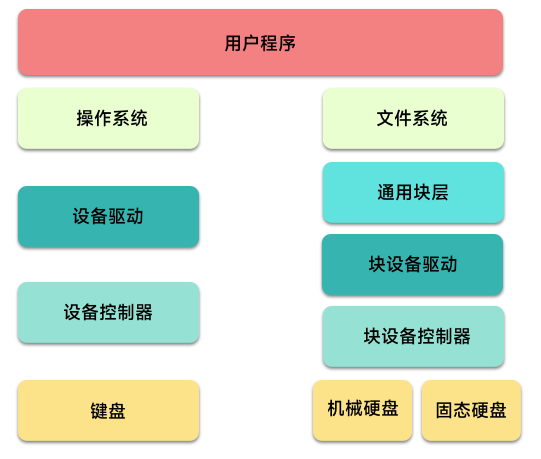
The abstraction cannot stop there. Different block devices, such as disks and mechanical hard drives, have different device drivers. For the file system to have a uniform interface for reading and writing block devices, block devices need one more layer that hides the differences between their drivers.
The generic block layer gives file system implementers a single interface and removes the need to care about different device drivers. A file system built on that interface can work with any block device.
The generic block layer turns operations on different block devices into operations on logical data blocks. In effect, every block device becomes an array of data blocks, and the file system manages those blocks. Whether the underlying device is a disk or a mechanical hard drive, the file system can use the same interface to read and write data blocks.
At this point, after layer upon layer of encapsulation and abstraction, the overall control structure looks like this:
How does the CPU know a device has finished?
After the CPU controls a device, it needs to confirm whether the operation succeeded or receive output from the device. That requires a reasonable control method.
Polling
Suppose the CPU asks a device controller to read some data. When reading finishes, the controller sets a status register to 1 to indicate completion. The CPU must repeatedly check that register to see whether the read is done. This is polling.
Clearly, polling can consume a large amount of CPU resources.
Interrupts
Interrupts solve part of that problem. The hardware triggers an interrupt through an interrupt controller. When a device task finishes, or when an input signal arrives, the interrupt controller notifies the CPU. The CPU receives the interrupt signal and handles it.
That sounds good, but too many interrupts can also make the system consume a lot of CPU time. Hardware interrupts are especially hard to hold back.
DMA
For disks that are read and written frequently, interrupting the CPU all the time is not friendly. DMA, or Direct Memory Access, lets a device place data into memory without CPU participation. This depends on support from a DMA controller.
A keypress, end to end
With the I/O system in view, a keyboard input can be followed roughly like this:
- A key is pressed.
- The keyboard controller scans and obtains the key data.
- After buffering, the data is sent over the bus to the CPU as an interrupt request.
- The CPU receives the interrupt request, saves the current context, and calls the interrupt handler.
- The interrupt handling routine reads the corresponding character and places it into the display controller's data buffer.
- The display device controller shows the character in the correct position.
- The CPU restores the interrupt context and continues processing.
Many details are certainly hidden in that sequence, but the basic shape of what happens after a keypress is this.
What stays with me
One lesson is that abstraction keeps showing up in computer systems. To control many different kinds of things, interfaces are often pulled out for higher layers to use, and management becomes easier.
Another lesson is that polling is often less pleasant than listening. Polling tends to waste performance. Device interrupt signals and system listening feel like more reasonable designs. Still, interrupts sometimes need further optimization: too many interrupts can interfere with normal work and make the system feel sluggish.
For the operating system's I/O system, I do not need to know every detail. Much of it is tied to hardware devices, and drivers and device controllers handle a great deal. For the operating system itself, and especially for many software design questions, some basic block device concepts and the overall design are enough. That is about as far as this developer needs to go for now.