Why commit messages matter more than people think
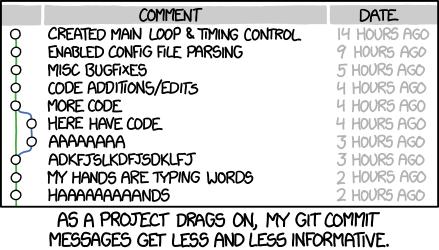
Browse the history of almost any Git repository and you will usually find a mess: messages of wildly different lengths, styles, and usefulness. That kind of inconsistency is common. Compare a noisy, overstuffed log entry with a history full of short, clear summaries, and the difference is immediate.
A diff tells you what changed. A commit message is what tells everyone else why it changed.
That includes your teammates, but it also includes your future self. Reconstructing the context behind an old change is slow, frustrating work. Good commit messages reduce that cost. In that sense, they are not decoration; they are part of the collaboration.
Many developers do not spend much time with git log and related tools precisely because commit history is often inconsistent and unhelpful. That creates a feedback loop: people ignore the history because it is messy, and it stays messy because nobody treats it as important.
But a well-kept history changes how useful Git becomes. Commands like git blame, revert, rebase, log, and shortlog become much more valuable. Reviewing old commits or pull requests stops feeling like archaeology. Understanding why something changed six months or three years ago becomes realistic instead of painful.
Long-term maintainability depends not only on the codebase, but also on the record of how that codebase evolved. Learning how to write commit messages well is worth the effort. It may feel awkward at first, but it quickly becomes habit, and then a genuine advantage.
This is only the most basic part of keeping a healthy project history: writing an individual commit message well. Other practices matter too—such as squashing commits appropriately—but this is the foundation.
As with coding style, teams benefit from conventions. Without them, every person invents a different format and the project history becomes harder to read. A useful commit message convention should define at least three things:
Style. Syntax, wrapping width, capitalization, punctuation, and formatting. Remove the guesswork and keep the rules simple enough that people will actually follow them.
Content. What belongs in the body of a message, and what does not.
Metadata. Where to put issue IDs, pull request numbers, and similar references.
The good news is that strong conventions already exist. You do not need to invent a new system. Follow these seven rules and your commit history will look dramatically better.
Seven rules for writing solid Git commit messages
- Separate subject from body with a blank line
- Limit the subject line to 50 characters
- Capitalize the subject line
- Do not end the subject line with a period
- Use the imperative mood in the subject line
- Wrap the body at 72 characters
- Use the body to explain what and why vs. how
For example:
Summarize changes in around 50 characters or less

More detailed explanatory text, if necessary. Wrap it to about 72
characters or so. In some contexts, the first line is treated as the
subject of the commit and the rest of the text as the body. The
blank line separating the summary from the body is critical (unless
you omit the body entirely); various tools like `log`, `shortlog`
and `rebase` can get confused if you run the two together.

Explain the problem that this commit is solving. Focus on why you
are making this change as opposed to how (the code explains that).
Are there side effects or other unintuitive consequences of this
change? Here's the place to explain them.

Further paragraphs come after blank lines.

 - Bullet points are okay, too

 - Typically a hyphen or asterisk is used for the bullet, preceded
   by a single space, with blank lines in between, but conventions
   vary here

If you use an issue tracker, put references to them at the bottom,
like this:

Resolves: #123
See also: #456, #789
1. Separate subject from body with a blank line
Not every commit needs both a subject and a body. If the change is tiny and obvious, a single line may be enough:
Fix typo in introduction to user guide
That is often sufficient. Anyone curious about the exact typo can inspect the diff with git show, git diff, or git log -p.
When committing from the command line, this kind of message works fine with -m:
$ git commit -m"Fix typo in introduction to user guide"
But when a change needs context or explanation, add a body:
Derezz the master control program

MCP turned out to be evil and had become intent on world domination.
This commit throws Tron's disc into MCP (causing its deresolution)
and turns it back into a chess game.
For multi-line messages, writing in a proper text editor is usually much more comfortable than stuffing everything into -m.
The blank line is not just cosmetic. Git treats the first line as the subject in many places, and tools rely on that separation.
A normal log entry shows both parts:
$ git log
commit 42e769bdf4894310333942ffc5a15151222a87be
Author: Kevin Flynn <[email protected]>
Date:   Fri Jan 01 00:00:00 1982 -0200

 Derezz the master control program

 MCP turned out to be evil and had become intent on world domination.
 This commit throws Tron's disc into MCP (causing its deresolution)
 and turns it back into a chess game.
But git log --oneline shows only the subject:
$ git log --oneline
42e769 Derezz the master control program
And git shortlog also uses just the subject line when grouping commits by author:
$ git shortlog
Kevin Flynn (1):
      Derezz the master control program

Alan Bradley (1):
      Introduce security program "Tron"

Ed Dillinger (3):
      Rename chess program to "MCP"
      Modify chess program
      Upgrade chess program

Walter Gibbs (1):
      Introduce protoype chess program
Without that blank line, several Git tools stop parsing the message the way you expect.
2. Keep the subject line under 50 characters
Fifty characters is not a rigid law, but it is a very good target. It keeps summaries readable and forces you to express the change concisely.
A useful side effect: if summarizing the change in 50 characters feels impossible, the commit may be trying to do too much. That is often a sign you should split it into smaller, more atomic commits.
Interfaces reinforce this convention too. GitHub warns when the subject gets too long, and once it passes about 75 characters, the display gets truncated with an ellipsis.
Aim for 50. Treat 72 as a hard upper bound.
3. Capitalize the subject line
Simple rule, but worth keeping consistent.
Write this:
- Accelerate to 88 miles per hour
Not this:
- accelerate to 88 miles per hour
4. Do not end the subject line with a period
The subject line is a title, not a normal sentence. Final punctuation adds nothing, and when you are trying to stay within 50 characters, even a single character matters.
Better:
- Open the pod bay doors
Not:
- Open the pod bay doors.
5. Use the imperative mood in the subject line
The imperative mood means the subject should read like a command or instruction:
- Clean your room
- Close the door
- Take out the trash
This may feel slightly unnatural at first, but it matches Git's own built-in style.
Default messages generated by Git already follow this pattern:
Merge branch 'myfeature'
And with git revert:
Revert "Add the thing with the stuff"

This reverts commit cc87791524aedd593cff5a74532befe7ab69ce9d.
Even GitHub's merge button produces a message in the same form:
Merge pull request #123 from someuser/somebranch
So subject lines should look like this:
- Refactor subsystem X for readability
- Update getting started documentation
- Remove deprecated methods
- Release version 1.0.0
Many commit messages drift into other styles instead:
- Fixed bug with Y
- Changing behavior of X
- More fixes for broken stuff
- Sweet new API methods
A simple test makes the right form obvious. Your subject line should fit naturally after this phrase:
- If applied, this commit will here is your subject line
These work:
- If applied, this commit will refactor subsystem X for readability
- If applied, this commit will update getting started documentation
- If applied, this commit will remove deprecated methods
- If applied, this commit will release version 1.0.0
- If applied, this commit will merge pull request #123 from user/branch
These do not:
- If applied, this commit will fixed bug with Y
- If applied, this commit will changing behavior of X
- If applied, this commit will more fixes for broken stuff
- If applied, this commit will sweet new API methods
This rule matters most for the subject line. The body does not need to stay in imperative mood.
6. Wrap the body at 72 characters
Git does not wrap commit message text for you. If you write a body, you need to format it deliberately.
Wrapping at 72 characters is a practical convention. It leaves enough room for indentation while keeping the text comfortably inside an 80-character display.
A good editor helps a lot here. In some editors, setting up 72-character wrapping for commit messages is easy. Many traditional IDEs have historically been poor at this, though some have improved.
7. Use the body to explain what and why, not how
The code itself usually shows how a change was implemented. The commit message should preserve the context that the code cannot: what problem existed, why the old behavior was wrong or insufficient, what changed conceptually, and why this particular approach was chosen.
This example from the Bitcoin Core project shows the idea well:
commit eb0b56b19017ab5c16c745e6da39c53126924ed6
Author: Pieter Wuille <[email protected]>
Date:   Fri Aug 1 22:57:55 2014 +0200

   Simplify serialize.h's exception handling

   Remove the 'state' and 'exceptmask' from serialize.h's stream
   implementations, as well as related methods.

   As exceptmask always included 'failbit', and setstate was always
   called with bits = failbit, all it did was immediately raise an
   exception. Get rid of those variables, and replace the setstate
   with direct exception throwing (which also removes some dead
   code).

   As a result, good() is never reached after a failure (there are
   only 2 calls, one of which is in tests), and can just be replaced
   by !eof().

   fail(), clear(n) and exceptions() are just never called. Delete
   them.
The value of a message like this is enormous. It saves later readers from having to reverse-engineer the motivation from the diff alone. Without that context, the reasoning behind the change might be lost permanently.
In many cases, implementation details do not belong in the commit message at all. If the code is so complex that the how needs extensive explanation, that may be a sign the code itself needs better comments or clearer structure. The message should focus first on the motivation: what used to happen, what happens now, what was wrong with the previous state, and why this solution made sense.
Your future self may be very grateful.
A few practical habits that help
Learn to like the command line
For Git, the command line remains the most capable interface. IDE integration can be convenient for certain operations—using git rm when deleting a file, for example, or keeping renames in sync—but once you start committing carefully, rebasing, merging, or investigating history in depth, IDE workflows often become clumsy.
Git is incredibly powerful on its own terms. To get the most out of it, the command line is usually the best place to work.
And if you use Bash or Z shell, tab completion removes much of the pain of remembering subcommands and options.
Read Pro Git
Pro Git is available online for free, and it is well worth reading.