In a separated frontend and backend setup, redirecting users to HTML pages is usually not what you want. For authentication-related scenarios, the backend should simply return JSON so the frontend can decide how to react.
Returning JSON during login
Spring Security already provides hooks for authentication outcomes:
AuthenticationSuccessHandlerruns after a successful loginAuthenticationFailureHandlerruns after a failed login
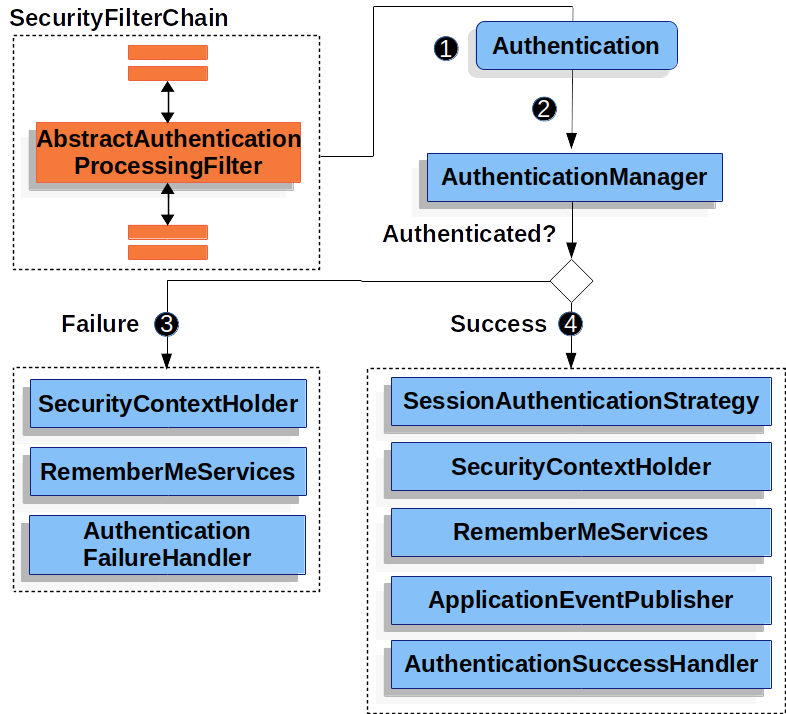
If the goal is to return JSON instead of redirecting to a page, these two interfaces are the key extension points.
Adding a JSON utility
The examples below use fastjson2:
1 2 3 4 5</th>
<th><dependency> <groupId>com.alibaba.fastjson2</groupId> <artifactId>fastjson2</artifactId> <version>2.0.52</version> </dependency></th>
</tr>
</thead>
<tbody>
<tr>
<td></td>
<td></td>
</tr>
</tbody>
</table>
Handling login success
A successful login can be turned into a JSON response by implementing AuthenticationSuccessHandler:
1 2 3 4 5 6 7 8 9 10 11 12 13 14 15 16 17 18 19</th>
<th>public class MyAuthenticationSuccessHandler implements AuthenticationSuccessHandler { @Override public void onAuthenticationSuccess(HttpServletRequest request, HttpServletResponse response, Authentication authentication) throws IOException, ServletException { var principal = authentication.getPrincipal(); // 获取登录用户信息 /* 更常用的为自定义响应 */ HashMap<Object, Object> result = new HashMap<>(); result.put("code", 0); result.put("msg", "登录成功"); result.put("data", principal); String json = JSON.toJSONString(result); response.setContentType("application/json;charset=utf-8"); response.getWriter().println(json); } }</th>
</tr>
</thead>
<tbody>
<tr>
<td></td>
<td></td>
</tr>
</tbody>
</table>
This example uses a simple HashMap as the response body. In a real project, a custom response class is often a cleaner choice.
After that, register the handler in the security configuration:
<table> <thead> <tr> <th>1 2 3 4 5 6 7 8 9 10 11 12 13 14 15</th>
<th>@Configuration public class WebSecurityConfig { @Bean public SecurityFilterChain filterChain(HttpSecurity http) throws Exception { http.authorizeHttpRequests( authorize->authorize .anyRequest().authenticated() ); http.formLogin(login->login .loginPage("/login").permitAll() .successHandler(new MyAuthenticationSuccessHandler()) // 登录成功处 ); http.csrf(AbstractHttpConfigurer::disable); return http.build(); } }</th>
</tr>
</thead>
<tbody>
<tr>
<td></td>
<td></td>
</tr>
</tbody>
</table>
Once configured, a successful login will return JSON rather than sending the user to another page.
Handling login failure
Failed authentication can be handled the same way through AuthenticationFailureHandler:
1 2 3 4 5 6 7 8 9 10 11 12 13 14 15 16 17 18</th>
<th>public class MyAuthenticationFailureHandler implements AuthenticationFailureHandler { @Override public void onAuthenticationFailure(HttpServletRequest request, HttpServletResponse response, AuthenticationException exception) throws IOException, ServletException { String localizeMessage = exception.getLocalizedMessage(); /* 更常用的为自定义响应 */ HashMap<Object, Object> result = new HashMap<>(); result.put("code", -1); result.put("msg", localizeMessage); String json = JSON.toJSONString(result); response.setContentType("application/json;charset=utf-8"); response.getWriter().println(json); } }</th>
</tr>
</thead>
<tbody>
<tr>
<td></td>
<td></td>
</tr>
</tbody>
</table>
This also returns a plain HashMap, with the exception message used as the failure message.
Register it in the same configuration:
<table> <thead> <tr> <th>1 2 3 4 5 6 7 8 9 10 11 12 13 14 15 16 17</th>
<th>@Configuration public class WebSecurityConfig { @Bean public SecurityFilterChain filterChain(HttpSecurity http) throws Exception { http.authorizeHttpRequests( authorize->authorize .anyRequest().authenticated() ); http.formLogin(login->login .loginPage("/login").permitAll() .successHandler(new MyAuthenticationSuccessHandler()) // 登录成功 .failureHandler(new MyAuthenticationFailureHandler()) // 登录失败 ); http.csrf(AbstractHttpConfigurer::disable); return http.build(); } }</th>
</tr>
</thead>
<tbody>
<tr>
<td></td>
<td></td>
</tr>
</tbody>
</table>
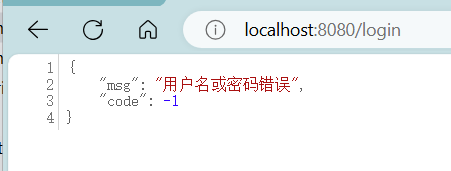
A failed login will then produce a JSON response like this:
Returning JSON on logout
Logout can be customized in the same style by implementing LogoutSuccessHandler:
1 2 3 4 5 6 7 8 9 10 11 12 13 14 15 16</th>
<th>public class MyLogoutSuccessHandler implements LogoutSuccessHandler { @Override public void onLogoutSuccess(HttpServletRequest request, HttpServletResponse response, Authentication authentication) throws IOException, ServletException { HashMap<Object, Object> result = new HashMap<>(); result.put("code", 200); result.put("msg", "注销成功"); String json = JSON.toJSONString(result); response.setContentType("application/json;charset=utf-8"); response.getWriter().println(json); } }</th>
</tr>
</thead>
<tbody>
<tr>
<td></td>
<td></td>
</tr>
</tbody>
</table>
Then wire it into the config:
<table> <thead> <tr> <th>1 2 3 4 5 6 7 8 9 10 11 12 13 14 15 16 17 18 19 20</th>
<th>@Configuration public class WebSecurityConfig { @Bean public SecurityFilterChain filterChain(HttpSecurity http) throws Exception { http.authorizeHttpRequests( authorize->authorize .anyRequest().authenticated() ); http.formLogin(login->login .loginPage("/login").permitAll() .successHandler(new MyAuthenticationSuccessHandler()) .failureHandler(new MyAuthenticationFailureHandler()) ); http.logout(logout->logout .logoutSuccessHandler(new MyLogoutSuccessHandler()) // 注销成功处理 ); http.csrf(AbstractHttpConfigurer::disable); return http.build(); } }</th>
</tr>
</thead>
<tbody>
<tr>
<td></td>
<td></td>
</tr>
</tbody>
</table>
With this in place, logging out also returns JSON to the client.
What happens when an unauthenticated request hits a protected API
By default, if a user accesses an endpoint that requires authentication, Spring Security uses AuthenticationEntryPoint to redirect the request to the login page. In a frontend–backend split architecture, that redirect is typically undesirable, so this needs to be replaced with a JSON response as well.
Implementing AuthenticationEntryPoint
<table>
<thead>
<tr>
<th>1 2 3 4 5 6 7 8 9 10 11 12 13 14 15</th>
<th>public class MyAuthenticationEntryPoint implements AuthenticationEntryPoint { @Override public void commence(HttpServletRequest request, HttpServletResponse response, AuthenticationException authException) throws IOException, ServletException { String localizeMessage = exception.getLocalizedMessage(); HashMap<Object,Object> result = new HashMap<>(); result.put("code",-1); result.put("msg", localizeMessage); String json = JSON.toJSONString(result); response.setContentType("application/json;charset=utf-8"); response.getWriter().println(json); } }</th>
</tr>
</thead>
<tbody>
<tr>
<td></td>
<td></td>
</tr>
</tbody>
</table>
Register it in the exception handling section of the configuration:
<table> <thead> <tr> <th>1 2 3 4 5 6 7 8 9 10 11 12 13 14 15 16 17 18 19 20 21 22 23 24</th>
<th>@Configuration public class WebSecurityConfig { @Bean public SecurityFilterChain filterChain(HttpSecurity http) throws Exception { http.authorizeHttpRequests( authorize->authorize .anyRequest().authenticated() ); http.formLogin(login->login .loginPage("/login").permitAll() .successHandler(new MyAuthenticationSuccessHandler()) .failureHandler(new MyAuthenticationFailureHandler()) ); http.logout(logout->logout .logoutSuccessHandler(new MyLogoutSuccessHandler()) ); http.exceptionHandling(exception->exception // 未登录处理 .authenticationEntryPoint(new MyAuthenticationEntryPoint()) ); http.csrf(AbstractHttpConfigurer::disable); return http.build(); } }</th>
</tr>
</thead>
<tbody>
<tr>
<td></td>
<td></td>
</tr>
</tbody>
</table>
After this, accessing a protected API without being logged in will return JSON instead of redirecting the browser to a login page.
Reading the current user’s authentication information
Spring Security stores the user’s authentication state inside Authentication. It includes three especially important parts:
Principal: user identity informationCredentials: user credentialsAuthorities: user permissions
In a controller, you can retrieve it from SecurityContextHolder and return the pieces you need:
1 2 3 4 5 6 7 8 9 10 11 12 13 14 15</th>
<th>@RestController public class IndexController { @GetMapping("/") public HashMap<Object,Object> index(){ HashMap<Object, Object> result = new HashMap<>(); Authentication authentication = SecurityContextHolder.getContext().getAuthentication(); // var principal = authentication.getPrincipal(); // var credentials = authentication.getCredentials(); Collection<? extends GrantedAuthority> authorities = authentication.getAuthorities(); result.put("code",0); result.put("authentication",authorities); return result; } }</th>
</tr>
</thead>
<tbody>
<tr>
<td></td>
<td></td>
</tr>
</tbody>
</table>
In practice, it is usually better not to return principal or credentials directly. They are commented out here only to show how they can be obtained.
Handling concurrent logins in the same account
Another common requirement is dealing with repeated logins for the same account: when a later login should force the earlier session offline.
To handle that case, implement SessionInformationExpiredStrategy:
1 2 3 4 5 6 7 8 9 10 11 12 13</th>
<th>public class MySessionInformationExpiredStrategy implements SessionInformationExpiredStrategy { @Override public void onExpiredSessionDetected(SessionInformationExpiredEvent event) throws IOException, ServletException { HashMap<Object,Object> result = new HashMap<>(); result.put("code", -1); result.put("msg", "您的账号已在其他地方登录,您被迫下线!"); String json = JSON.toJSONString(result); event.getResponse().setContentType("application/json;charset=utf-8"); event.getResponse().getWriter().println(json); } }</th>
</tr>
</thead>
<tbody>
<tr>
<td></td>
<td></td>
</tr>
</tbody>
</table>
Then add it to session management:
<table> <thead> <tr> <th>1 2 3 4 5 6 7 8 9 10 11 12</th>
<th>@Configuration public class WebSecurityConfig { @Bean public SecurityFilterChain filterChain(HttpSecurity http) throws Exception { ... http.sessionManagement(session->session .maximumSessions(1).expiredSessionStrategy(new MySessionInformationExpiredStrategy()) // session管理 ); ... return http.build(); } }</th>
</tr>
</thead>
<tbody>
<tr>
<td></td>
<td></td>
</tr>
</tbody>
</table>
That setup limits the account to a single session, and when another login invalidates the earlier one, the displaced user receives a JSON message explaining that the account has been used elsewhere and they have been logged out.