I spent this morning reading through Kilo’s source code. I’ve been curious for a long time about how text editors are actually built, and Kilo is the kind of project that makes that curiosity feel rewarding almost immediately.
It is tiny, but not toy-like. The whole program lives in a single file of roughly 1,300 lines, yet it lays out the core structure of a terminal text editor with remarkable clarity. The point is not to teach you how to build a production-grade editor with all the engineering polish that implies. Its real value is in showing how to break down something that seems messy and intimidating into a manageable set of moving parts: opening files, editing text, saving changes, drawing to the terminal, tracking cursor state, and layering syntax highlighting on top.
That alone makes it a very good starting point. And as a side effect, it is also a satisfying little tour through C, even if most of the fun comes from reading rather than writing.
Tracing the program flow
The entire project is just one file, so it is possible to follow the full execution path without drowning in scaffolding. I spent about an hour and a half mapping the flow by hand, then turned it into a cleaner diagram with Graphviz:
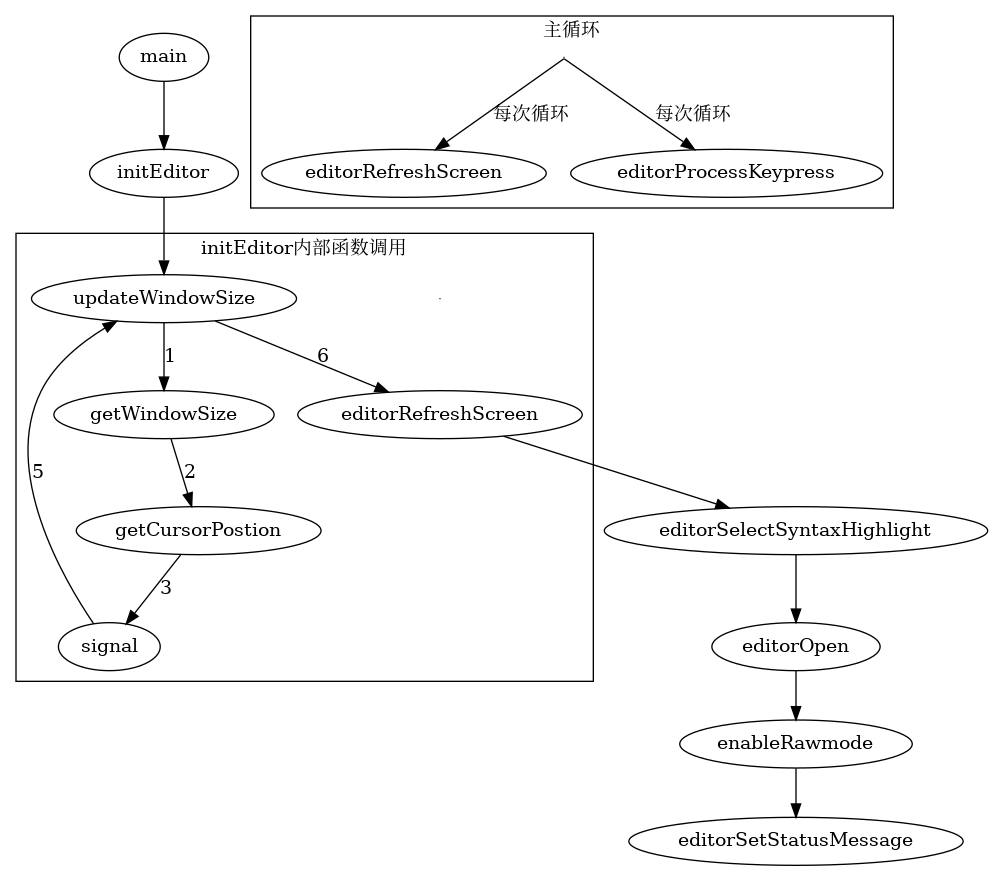
Even with some deeper calls omitted, the diagram was enough to make the editor’s overall structure click into place.
Once you line the flowchart up with the source, one thing becomes obvious: the editor’s core actions—open, edit, save—are not especially hard to implement. The classic pain points in C are the familiar ones: buffer handling, file I/O, memory management, and all the little edge cases around them.
In Kilo, the heaviest and most frequently touched pieces are initEditor and the syntax-highlighting pipeline that follows. initEditor in particular does a lot of work around terminal dimensions and the mechanics of setting up the runtime state. More than anything else, interacting with the terminal itself is what makes the program feel tedious. The terminal does not give you much abstraction for free, so a lot of the behavior has to be handled manually and debugged by hand.
Terminal input and signal handling
One thing that stood out to me is how terminal programs typically combine raw mode with signal-related functions to implement keyboard behavior. Understanding signal() and the surrounding macros took me quite a while.
At a basic level, signal is used to handle signals generated in the terminal. For example, SIGINT is the interrupt signal produced by Ctrl-C, while SIGIGN means “ignore this signal.” The awkward part is the function signature:
void (*signal(int sig, void (*func)(int)))(int);
This looks much worse than it is. In plain English, it takes two parameters:
sig, anintidentifying which signal you want to handle, such asSIGINTfunc, a function pointer to the handler that should run when that signal arrives
And it returns the previous signal handler.
Using typedef makes the declaration much easier to read:
// 定义信号处理函数的类型
typedef void (*sighandler_t)(int);

// 用 typedef 重写 signal 声明
sighandler_t signal(int sig, sighandler_t func);
If you want Ctrl-C to do nothing, this is the idea:
signal(SIGINT, SIGIGN);
Kilo handles the situation a little differently. It reads a key in raw mode through editorReadKey(), stores the result, matches it with a switch, and then the caller uses another switch to dispatch the corresponding editor action. For Ctrl-C, it simply breaks out:
...

case CTRL_C: /* Ctrl-c */
        /* We ignore ctrl-c, it can't be so simple to lose the changes
         * to the edited file. */
        break;

...
That design has limits. Different terminal emulators may emit different escape sequences, so hardcoding escape values can produce compatibility problems. And using blocking read() for input comes with performance constraints of its own.
The data structures are where the design really shines
The most interesting part of Kilo is not any one trick, but the clarity of its data structures. editorConfig is a great example:
struct editorConfig {
    int cx, cy;     /* Cursor x and y position in characters */
    int rowoff;     /* Offset of row displayed. */
    int coloff;     /* Offset of column displayed. */
    int screenrows; /* Number of rows that we can show */
    int screencols; /* Number of cols that we can show */
    int numrows;    /* Number of rows */
    int rawmode;    /* Is terminal raw mode enabled? */
    erow *row;      /* Rows */
    int dirty;      /* File modified but not saved. */
    char *filename; /* Currently open filename */
    char statusmsg[80];
    time_t statusmsg_time;
    struct editorSyntax *syntax; /* Current syntax highlight, or NULL. */
};
There is a single global instance of this structure, and it holds the editor’s fundamental state: cursor position, scroll offset, terminal size, the rows currently loaded, whether the file is dirty, what file is open, and what syntax mode is active.
That makes the state transitions of the whole program easy to reason about. And these are exactly the things a text editor must care about at its core: where the cursor is, what part of the buffer is visible, what the underlying data looks like, and whether the file has changed.
For a beginner, this kind of design is eye-opening. It gives the program a center of gravity. You can inspect the current state or update it for a specific feature without scattering everything across unrelated globals and ad hoc variables.
Separating stored text from rendered text
Inside editorConfig, the editor stores rows as erow values:
typedef struct erow {
    int idx;           /* Row index in the file, zero-based. */
    int size;          /* Size of the row, excluding the null term. */
    int rsize;         /* Size of the rendered row. */
    char *chars;       /* Row content. */
    char *render;      /* Row content "rendered" for screen (for TABs). */
    unsigned char *hl; /* Syntax highlight type for each character in render.*/
    int hl_oc;         /* Row had open comment at end in last syntax highlight
                          check. */
} erow;
The subtle but important field here is render. Kilo does not treat “what is stored in memory” and “what should be shown on screen” as the same thing.
In editorUpdateRow(), you can see why:
unsigned int tabs = 0, nonprint = 0;
    int j, idx;

    /* Create a version of the row we can directly print on the screen,
     * respecting tabs, substituting non printable characters with '?'. */
    free(row->render);
    for (j = 0; j < row->size; j++)
        if (row->chars[j] == TAB)
            tabs++;

    unsigned long long allocsize =
        (unsigned long long)row->size + tabs * 8 + nonprint * 9 + 1;
    if (allocsize > UINT32_MAX) {
        printf("Some line of the edited file is too long for kilo\n");
        exit(1);
    }
The TAB used in the loop is defined in the KEY_ACTION enum with the value 9, which is \t in ASCII—a horizontal tab.
The issue is simple: in memory, \t takes one byte, but on screen it may expand to eight columns. That is exactly why render exists. If a line contains two tabs, and each can expand to as many as eight spaces, then the allocation needs to account for that extra width:
(unsigned long long)row->size + tabs * 8 + nonprint * 9 + 1;
The nonprint variable is always zero here, which suggests it may have been intended for future handling of non-printable characters. The final +1 reserves space for \0.
Memory is then allocated for render using that formula:
row->render = malloc(row->size + tabs * 8 + nonprint * 9 + 1);
And the next section fills in the expanded visual form of the row by padding spaces where needed:
idx = 0;
    for (j = 0; j < row->size; j++) {
        if (row->chars[j] == TAB) {
            row->render[idx++] = ' ';
            while ((idx + 1) % 8 != 0) // 在非制表位填充空格
                row->render[idx++] = ' ';
        } else { // 正常字符直接赋值
            row->render[idx++] = row->chars[j];
        }
    }

row->rsize = idx; // 在循环结束的时候,idx等于写入字符总数
row-render[idx] = '\0'; //在字符末尾添加结束符
It takes a moment to unpack, but it is a very clever design. The editor keeps the original data intact in chars, while render holds a screen-friendly version with tabs expanded. That separation makes later operations—drawing, cursor calculation, highlighting—much easier to manage.
Syntax highlighting: straightforward, effective, and limited
A large portion of the source is devoted to syntax highlighting. Kilo starts by defining keyword tables, including extensions and C/C++ keyword lists:
char *C_HL_extensions[] = {".c", ".h", ".cpp", ".hpp", ".cc", NULL};
char *C_HL_keywords[] = {
    /* C Keywords */
    "auto", "break", "case", "continue", "default", "do", "else", "enum",
    "extern", "for", "goto", "if", "register", "return", "sizeof", "static",
    "struct", "switch", "typedef", "union", "volatile", "while", "NULL",

    /* C++ Keywords */
    "alignas", "alignof", "and", "and_eq", "asm", "bitand", "bitor", "class",
    "compl", "constexpr", "const_cast", "deltype", "delete", "dynamic_cast",
    "explicit", "export", "false", "friend", "inline", "mutable", "namespace",
    "new", "noexcept", "not", "not_eq", "nullptr", "operator", "or", "or_eq",
    "private", "protected", "public", "reinterpret_cast", "static_assert",
    "static_cast", "template", "this", "thread_local", "throw", "true", "try",
    "typeid", "typename", "virtual", "xor", "xor_eq",

    /* C types */
    "int|", "long|", "double|", "float|", "char|", "unsigned|", "signed|",
    "void|", "short|", "auto|", "const|", "bool|", NULL};
Then editorUpdateSyntax() walks through characters and matches them against these keywords in a fairly direct way.
For a teaching project, that approach is perfectly reasonable. In a larger real-world editor, I would expect this part to be replaced by something more structured: lexical analysis, parsing, or at least a trie-based matcher. Those approaches are easier to maintain, easier to extend, and better suited to more complex nesting and language rules.
Still, Kilo’s version has pedagogical value precisely because it is so plain. You can read it and understand what it is doing without needing a compiler theory detour first.
Where the rough edges suggest future improvements
The shortcomings in the implementation also point naturally toward possible upgrades.
You could imagine a cleaner input abstraction, more robust terminal handling, or syntax support built on a lexer/parser pipeline. You could also imagine connecting the editor to an LSP server, or exposing extension hooks through Lua. Those all sound appealing.
That said, bolting these things onto an old-school pure C terminal application would likely be painful and time-consuming. Among the possible improvements, using something like termcap for key handling probably feels more realistic than overhauling the entire highlighting system first.
Why this project is so worth studying
The best lesson in Kilo is not just how to write a terminal editor, but how to connect abstract features to a concrete environment with very little help from the platform. It is also a strong example of thoughtful data structure design and of using the C standard library in practical ways.
If you wanted a compact demonstration of the idea that “programs = data structures + algorithms,” this is a pretty convincing one.
Personally, I doubt I would have come up with these structures on my own. I might even have ended up rebuilding things the standard library already provides instead of using them properly. Reading a project like this is useful exactly because it compresses someone else’s design judgment into a form you can inspect line by line.
The process of learning from it is fun too: start from main, jump through the call chain, follow A calling B, B calling C, C calling D, and then sketch the logic once it finally makes sense. When a particular section gets interesting, stop and dig in deeper. There is a wonderful feeling in that process, like someone else’s hard-won understanding is ironing the wrinkles out of your own brain.
If you can really read Kilo fluently, you are at least nudging open the door to understanding projects like Vim or Nano.
I would genuinely like to reimplement it myself and then try adding my own ideas on top—maybe tying in Lua, Zig, or even Go for higher-level features. That sounds extremely fun.
And while looking things up along the way, I also stumbled across vis and micro—the latter is even written in Go. More toys to explore.