MCP has been in the air long enough that you have probably read a few introductions. If you have not actually tried it, or you want to build an MCP service in Go, this walkthrough puts together a complete local setup with ollama, mcp-go, and Cherry Studio. The same idea works with other MCP-capable clients, such as Claude Desktop. For the model, I use qwen2.5:7b through ollama; if your machine cannot run it, an online provider works too.
What MCP is doing
A quick plain-language explanation.
Without MCP: - User: Model, order me some takeout. - Model: Sure. Here are the steps... but you will have to do it yourself, because I have no hands.
With MCP: - User: Model, order me some takeout. - Model: OK, I will use the MCP service to place a coffee order. - MCP service: Received. The coffee order has been submitted.
You do not need many details to get the point. A model provides conversation. When it needs to act on something, it cannot reach out by itself. External systems usually expose APIs so other systems can call them and receive a service. The problem with APIs is that each one has its own parameters and return shape. MCP's value is a protocol that standardizes how systems are connected, so a model can call them without bespoke glue. At a high level, it gives the model hands that can reach real business scenarios.
The goal: a filesystem tool, not another a+b
Many MCP examples I have seen offer a tool that adds two numbers, a + b = c. That does not show why MCP matters; the model can already do arithmetic. So this example lets the model operate files in a local directory. The point is to feel what it is like when the model can actually do something on your machine.
The code
No elaborate framework. Two files, and the flow is easy to follow.
tools.go
This file defines two functions for working with local files:
- listFiles lists files in a directory.
- renameFile renames a file.
The directoryPath constant limits the service to one allowed directory. That keeps the model away from files it should not see.
package main

import (
    "errors"
    "fmt"
    "os"
    "path/filepath"
    "strings"
)

const (
    directoryPath = "/tmp/linkinstar"
)

func listFiles(directory string, extension string) ([]string, error) {
    if strings.TrimSpace(directory) != directoryPath {
        return nil, errors.New(fmt.Sprintf("我无法访问目录 %s", directory))
    }
    fmt.Println("Listing files in directory :", directory)

    files, err := os.ReadDir(directory)
    if err != nil {
        return nil, err
    }

    var result []string
    for _, file := range files {
        if file.IsDir() {
            continue
        }
        if extension == "" || strings.HasSuffix(file.Name(), extension) {
            result = append(result, file.Name())
        }
    }
    return result, nil
}

func renameFile(directory string, oldName string, newName string) ([]string, error) {
    if strings.TrimSpace(directory) != directoryPath {
        return nil, errors.New(fmt.Sprintf("我无法访问目录 %s", directory))
    }
    fmt.Println("Renaming file:", oldName, "to", newName)

    err := os.Rename(filepath.Join(directory, oldName), filepath.Join(directory, newName))
    if err != nil {
        return nil, err
    }
    return listFiles(directory, "")
}
main.go
Next, register both tools on the MCP server and start an SSE endpoint. The tool definitions declare the required arguments. I will not go deep into SSE here; MCP also supports other transports, including standard input/output. SSE is simply the transport used in this example. Inside AddTool, the handler reads the arguments, calls the function from tools.go, and returns a text result.
package main

import (
    "context"
    "github.com/mark3labs/mcp-go/mcp"
    "github.com/mark3labs/mcp-go/server"
)

func main() {
    s := server.NewMCPServer("File manager server", "1.0.0")

    // Add tool: list files under /tmp
    listFilesTool := mcp.NewTool("list_files",
        mcp.WithDescription("列出指定目录下的文件"),
        mcp.WithString("directory",
            mcp.Required(),
            mcp.Description("要列出文件的目录"),
        ),
        mcp.WithString("extension",
            mcp.Description("要过滤的文件扩展名"),
        ),
    )

    s.AddTool(listFilesTool, func(ctx context.Context, request mcp.CallToolRequest) (*mcp.CallToolResult, error) {
        directory := request.Params.Arguments["directory"].(string)
        extension := request.Params.Arguments["extension"].(string)

        files, err := listFiles(directory, extension)
        if err != nil {
            return mcp.NewToolResultText(err.Error()), nil
        }

        res := "文件列表:\n"
        for _, file := range files {
            res += file + "\n"
        }

        return mcp.NewToolResultText(res), nil
    })

    // Add tool: rename a file
    renameFileTool := mcp.NewTool("rename_file",
        mcp.WithDescription("重命名文件"),
        mcp.WithString("directory",
            mcp.Required(),
            mcp.Description("要重命名文件的目录"),
        ),
        mcp.WithString("old_name",
            mcp.Required(),
            mcp.Description("要重命名的旧文件名"),
        ),
        mcp.WithString("new_name",
            mcp.Required(),
            mcp.Description("新的文件名"),
        ),
    )

    s.AddTool(renameFileTool, func(ctx context.Context, request mcp.CallToolRequest) (*mcp.CallToolResult, error) {
        directory := request.Params.Arguments["directory"].(string)
        oldName := request.Params.Arguments["old_name"].(string)
        newName := request.Params.Arguments["new_name"].(string)

        files, err := renameFile(directory, oldName, newName)
        if err != nil {
            return nil, err
        }

        res := "重命名后的文件列表:\n"
        for _, file := range files {
            res += file + "\n"
        }

        return mcp.NewToolResultText(res), nil
    })

    err := server.NewSSEServer(s).Start(":9999")
    if err != nil {
        panic(err)
    }

    return
}
Trying it out
Before testing, make sure the model supports MCP and is running. I used:
ollama run qwen2.5:7b
Configure the MCP service
The configuration is just the SSE endpoint:
http://127.0.0.1:9999/sse
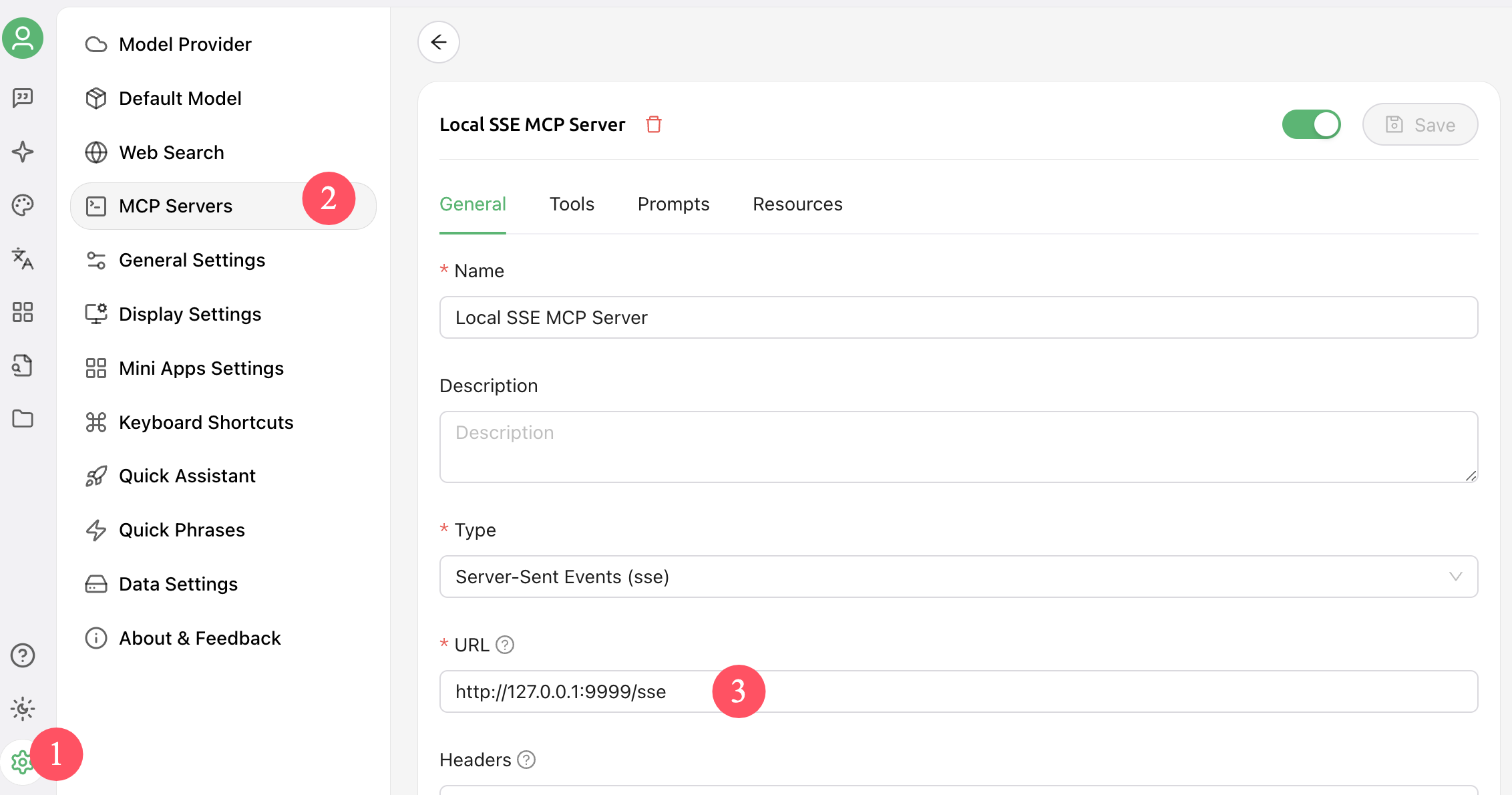
Remember to enable that MCP service before you start chatting.
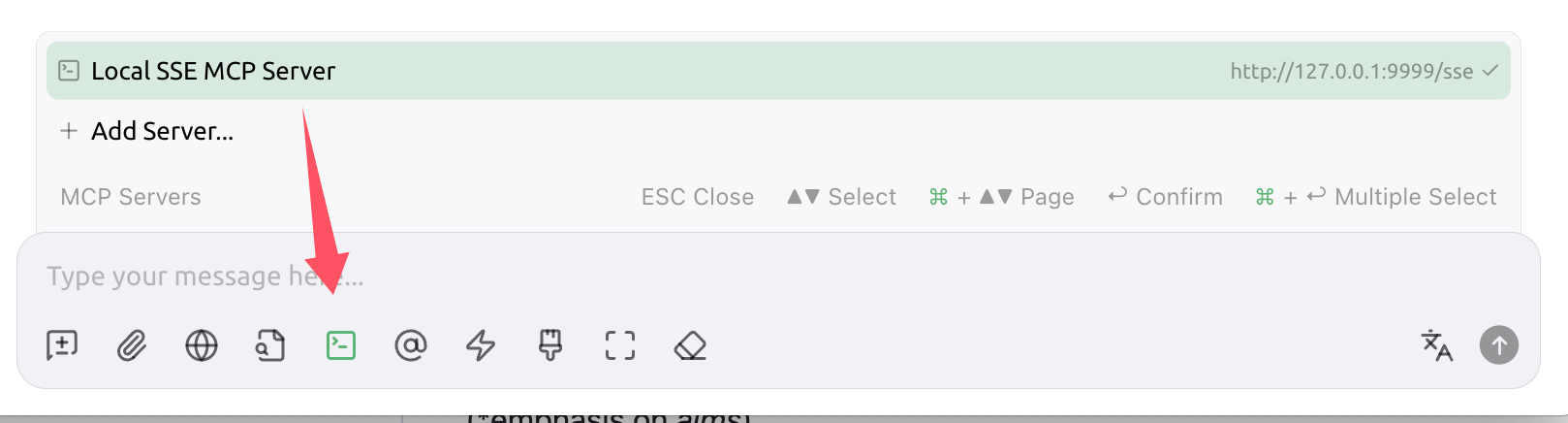
Chat test
If the client calls your MCP service during the conversation, it is working. The model should understand the request, choose the right tool, and use the service to perform the operation.
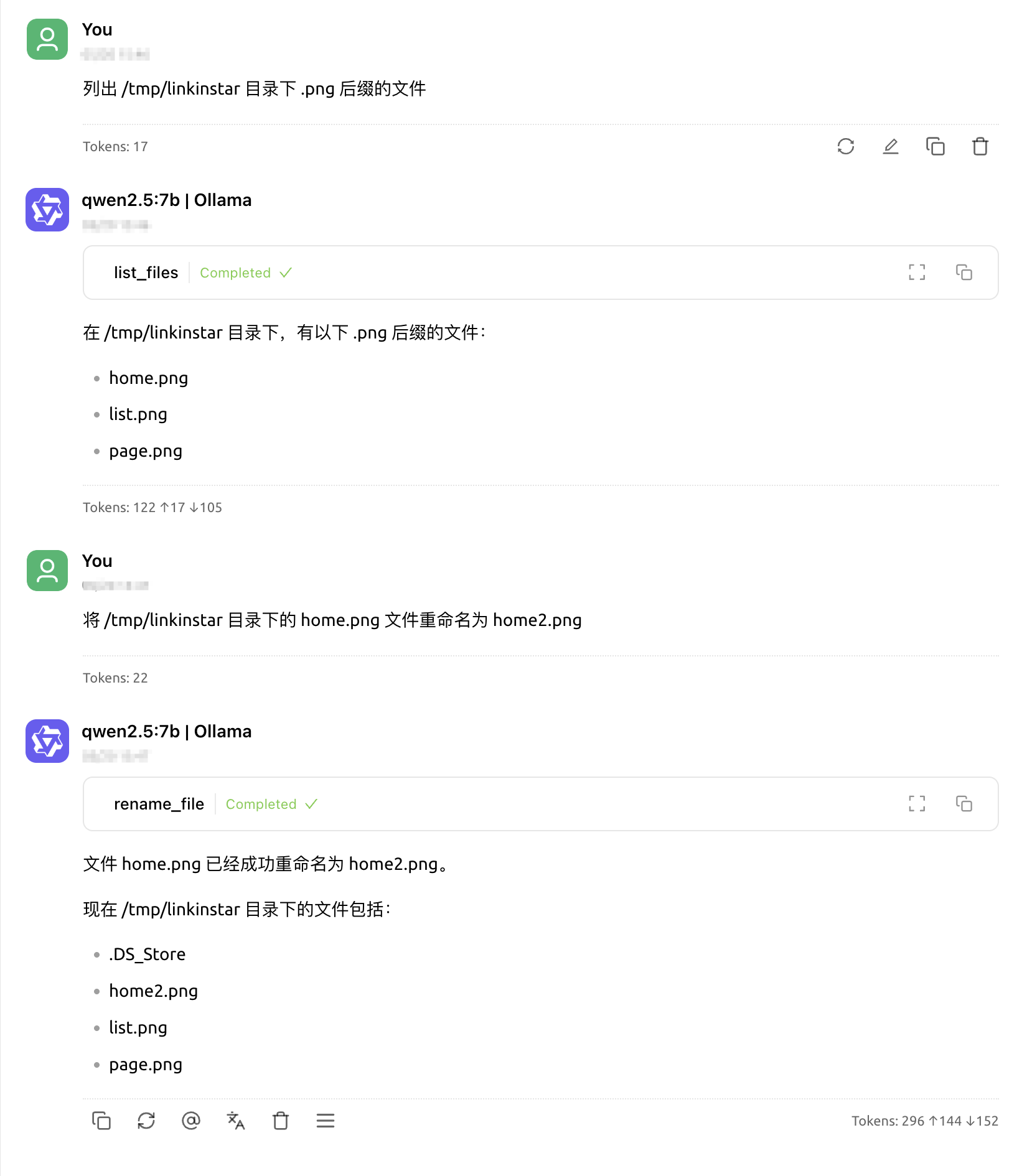
At this point the model's hands can reach into your local machine.
Where to take it next
The AddTool method is how you tell the model which tools exist. MCP also has AddResource and AddPrompt for exposing accessible resources and best-practice prompts. The example only lists and renames files, but you can extend it. For instance, you could build a local file organizer that takes a messy directory and sorts files into a sensible structure automatically.
The mental model is simple: the model is the brain. It interprets the instruction, breaks it into actions, calls the coordinating systems through MCP, and the work gets done. Build your own MCP service and see what else you can give the model hands for.