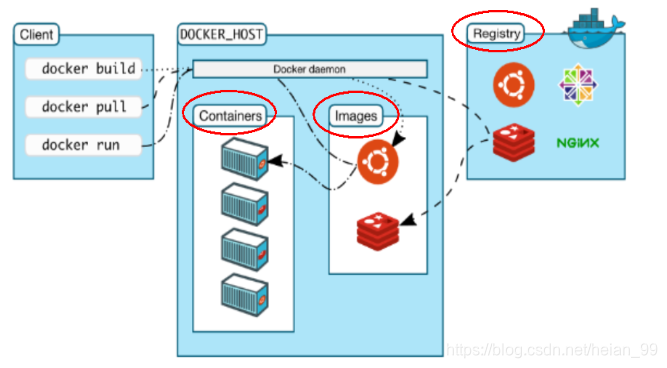
Docker’s basic structure rests on three pieces: images, containers, and repositories. They are closely related, but each does a different job.
Images
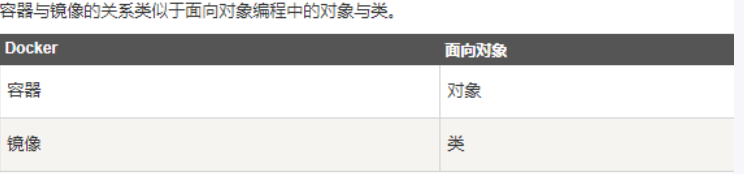
A Docker image is a read-only template. It is the basis for creating containers, and a single image can produce many containers. The image itself is not the running application; it defines what the container will contain and how it will be set up.
Containers
Docker uses containers to run an application, or a group of applications, independently. A container is a running instance created from an image. It can be started, stopped, removed, and restarted. Containers are isolated from one another and provide a secure platform for the processes inside.
A container can be thought of as a lightweight Linux environment—with root user privileges, process space, user space, network space, and so on—together with the application running in it.
Definition-wise, a container is almost the same as an image: both are a unified view of a stack of layers. The key difference is that the top layer of a container is readable and writable.
Repositories
A repository is a place where image files are stored centrally.
A repository and a registry are not the same thing. A registry usually holds multiple repositories; each repository contains multiple images; and each image can have different tags.
Repositories come in two forms: public and private.
The largest public repository is Docker Hub (https://hub.docker.com/), which holds a very large number of images available for users to download. Public repositories in China include Alibaba Cloud and NetEase Cloud, among others.
How the three fit together
Docker itself is a container runtime—a management engine. You package an application together with its configuration and dependencies into a deliverable runtime environment. That packaged environment is the image file. Only from this image file can Docker create a container. The image file can be seen as the container’s template; Docker uses it to generate container instances, and the same image file can generate multiple container instances running at the same time.
A container instance generated from an image file is itself a file, also referred to as an image file. In the usual model, one container runs one service. When needed, you can use the Docker client to create a corresponding runtime instance—that is, your container.
The repository is where a collection of images is kept. You can publish images to a repository and pull them down when you need them.