On August 21, DeepSeek added an experimental model to its API changelog: deepseek-v4-flash-vision-exp. It can interpret images and visual input. The announcement listed scores on agent benchmarks including Terminal Bench 2.1, NL2Repo, DeepSWE, and AutomationBench, and said the model comes close to Opus-4.8 on agent tests that require visual understanding. That second claim belongs to DeepSeek's own testing setup, not to a third party that put every competitor through the same set of real tasks.
Model updates are easy to compress into a sentence: a domestic code agent can now see the page. But understanding a screen is still some distance from finishing a task.
An agent can look at a payment page and recognize a button labeled Confirm payment. That does not mean it should click it. Even if it is allowed to click, that does not mean the order is a test order. And even if the request returns 200, that does not mean the money, the permissions, or the order state ended up in the right place. In the past, AI coding mostly meant watching code and tests. Once visual input enters the workflow, the screen itself becomes an object of acceptance.
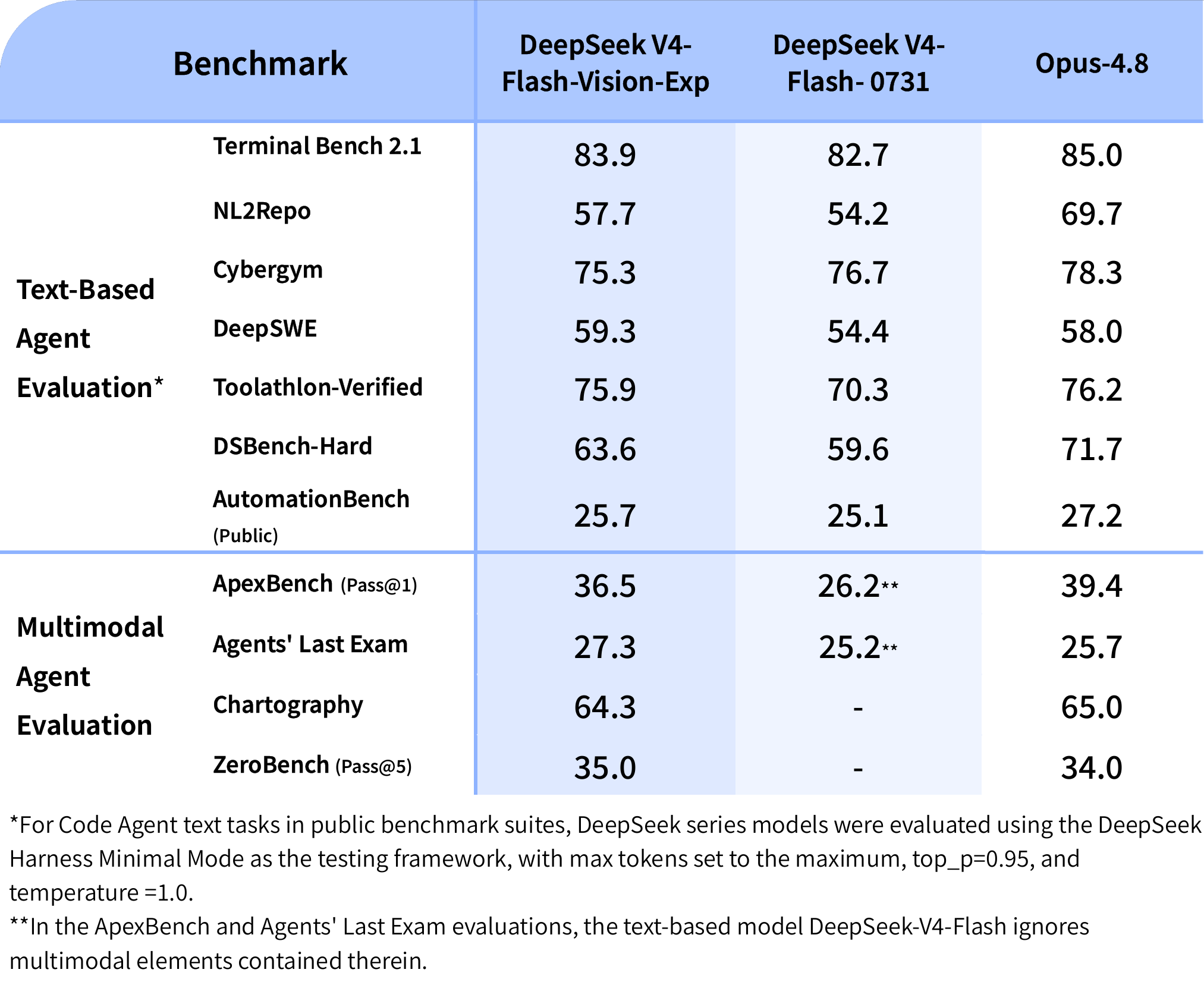
Image source: DeepSeek V4-Flash-Vision-Exp release notes. Scores are as published by DeepSeek.
Seeing a page is not the same as holding permission to act
Several ideas get mixed together here, so it helps to separate them.
Vision understanding deals with input. Give the model a screenshot, a design file, or a few frames from a screen recording, and it can identify text, controls, chart relationships, and page state. It can tell you whether an error appears in a modal, why a button is disabled, which column is missing from a table, or where a preview page diverges from the design.
Tool use deals with action. Whether the model can click, type, run commands, or upload files depends on the tools the host program exposes, not on whether the model has vision. Without a browser tool, network permissions, or file system access, it is at best an observer that can describe a page.
The third layer is where real trouble tends to appear: the runtime environment.
A test container, an isolated browser profile, a staging environment, and a production account can look almost identical. The difference is not on the screen. It is in what happens after a click. A mistake on a preview page usually means rerunning the job. A mistake inside an admin panel with a real login session can send email, change roles, delete data, or submit a payment that should never have been submitted.
DeepSeek's release page offers a reminder of this. The company defines V4-Flash-Vision-Exp as an experimental API model, invoked as deepseek-v4-flash-vision-exp. For public Code Agent text tasks, DeepSeek used Harness in minimal mode, with fixed conditions including max effort, topp=0.95, and temperature=1.0. Many people look at the scores first. The footnote matters more: the model does not run outside an environment. The harness, tool configuration, and parameters all affect what it can finish.
The same applies when a vision model enters a workflow. A model that can read pages does not mean the account permissions, browser isolation, business rules, and human confirmation have caught up.
Green tests may only mean the code is fine
The acceptance path for traditional code tasks is relatively clear. Look at the diff, run unit tests, wait for CI, and open a preview environment when needed. These steps answer one question: was this code change correct?
Interface tasks ask a few more questions.
Suppose an agent receives a routine request: fix the coupon input field on a checkout page that gets covered on narrow screens. It looks at screenshots, changes CSS, the build passes, and unit tests are green. That is good news, but it is not enough to ship.
Is the input actually visible at common mobile widths? After an error message appears, does focus remain in a sensible place? Can keyboard users continue filling the form? Is this page using a fake order, or is it connected to a real payment provider configuration? If the agent clicks Confirm payment to verify, where does the request go?
These questions do not require a smarter model. They require the team to define done more concretely.
A multimodal agent's acceptance can be split into five layers:
<table> <thead> <tr> <th>Acceptance layer</th> <th>What to confirm</th> <th>Common evidence</th> </tr> </thead> <tbody> <tr> <td>Code change</td> <td>Whether the edit stays within the allowed scope and the logic matches intent</td> <td>diff, code review, static checks</td> </tr> <tr> <td>Program behavior</td> <td>Whether the change breaks existing functionality</td> <td>unit tests, integration tests, build results</td> </tr> <tr> <td>Interface state</td> <td>Whether the page the user actually sees is correct</td> <td>screenshots, DOM snapshots, visual regression results</td> </tr> <tr> <td>Account and permissions</td> <td>Who the agent acts as, and in which environment</td> <td>profile, environment identifier, authorization records, request target</td> </tr> <tr> <td>External consequences</td> <td>Whether the action actually changed the outside world</td> <td>approval records, API receipts, business audit logs</td> </tr> </tbody> </table>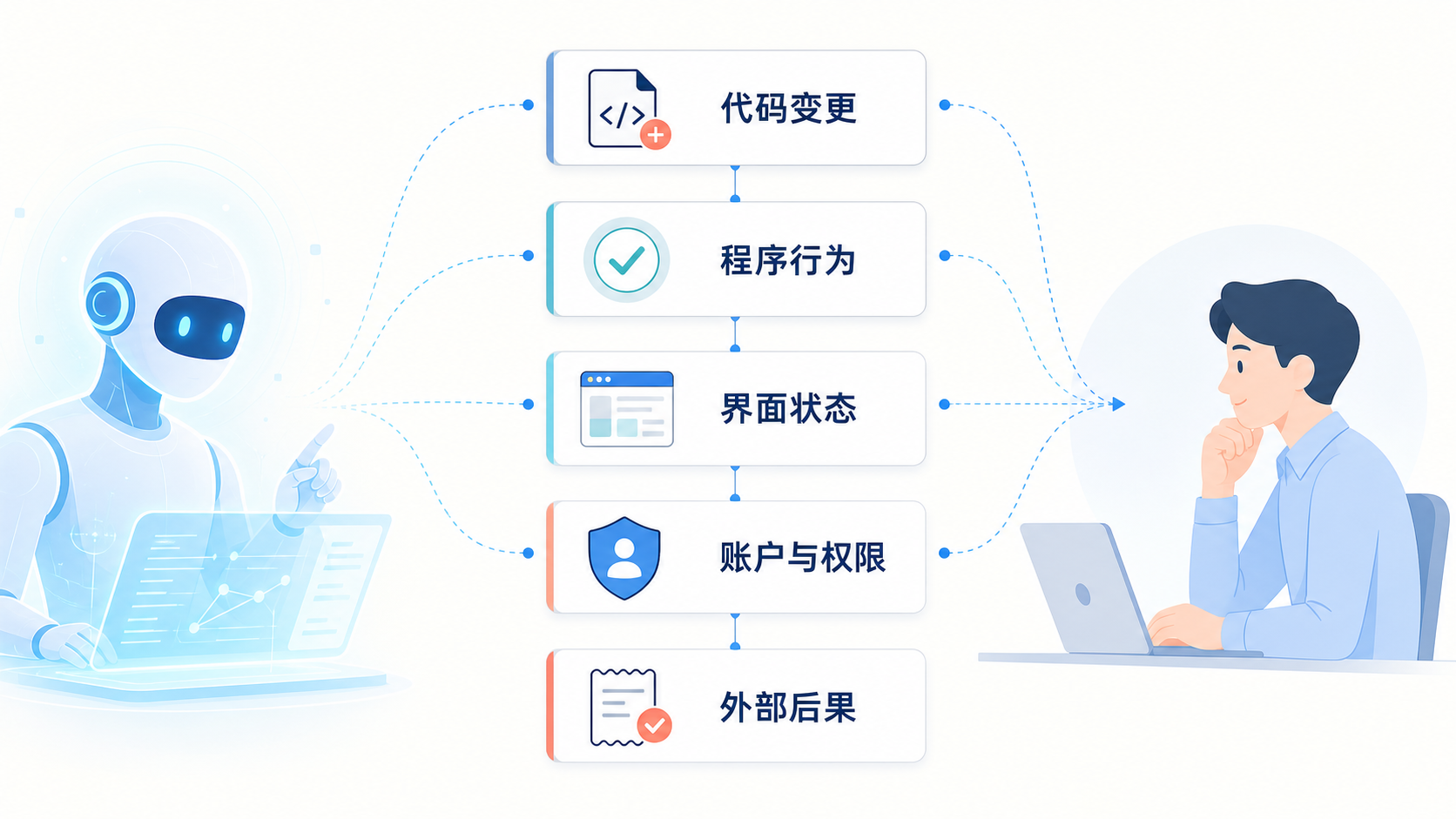
Engineering teams are already familiar with the first two layers. The hard part is often the last three.
Visual regression tests can tell you whether a button moved. They cannot tell you whether the agent inherited an administrator login session. An API returning 200 means the request succeeded. It does not guarantee that the request went to the right customer, the right workspace, or the right environment. The page may look calm while sitting on top of an entire set of permissions and business states.
So a screenshot that looks fine is one piece of evidence. It is not an acceptance conclusion.
You do not need a large platform before you can keep evidence
Multimodal agents do not have to wait for a whole new platform before they can be used. Many teams can start adding evidence inside the browser tests, logs, and approval flows they already have. The point is not to record everything. It is to keep state-changing steps from becoming a black box.
Scope must name the environment and the account
A task like check the admin payment flow for me is too broad even for a person, let alone an agent. Replace it with read-only access to the staging checkout preview, no production login, and no form submission. That is where boundaries start to appear.
In visual tasks, scope is not just a file path. The URLs, accounts, tenants, browser profiles, upload permissions, and network request permissions should all be written into the task. They can also become runtime rules: if a domain is not on the allowlist, or a page carries a production marker, pause instead of continuing to try.
Make it show before and after
When an agent writes fixed or checked, it should bring back something reviewable.
An interface check can leave before-and-after screenshots, or save a DOM snapshot and accessibility information for key elements. The purpose is not to collect images. It is to let a reviewer compare what the agent saw at the start, what changed after the edit, and whether the page is in the expected state.
Dynamic pages especially cannot be judged from a single frame. Loading complete, error messages, post-submit redirects, and skeleton screens on slow networks are different states. The task should say which states must be covered. Otherwise, the agent may stop at the first screenshot that looks normal.
State changes must be traceable
Not every click, keystroke, upload, or API call needs to become a long recording. But submitting, deleting, granting access, publishing, sending externally, and writing to shared data should be traceable back to a task.
At a minimum, the record should show when it happened, which identity was used, which object was affected, which parameters were sent, and what result came back. Keeping the target URL or resource ID, identity, request result, and task ID in the operation log makes debugging possible without guessing from screenshots.
With that trail, teams can distinguish an agent clicking the wrong page from a page reading stale cache. The two can look the same on screen, but the fixes are completely different.
Do not skip confirmation for actions with real consequences
Anthropic's Computer Use documentation draws clear boundaries: financial transactions, agreeing to terms, and similar matters that require affirmative consent should be confirmed by a human. Access to sensitive data and the scope of internet exposure should also be tightened to reduce the risk of prompt injection.
This is not a rule that applies to only one product. Payments, permission grants, sending messages, production releases, and deleting cloud resources are all hard to reconstruct from a screenshot when something goes wrong, no matter which model initiated them. Vision gives agents access to more interfaces, which makes stable confirmation points more important, not less.
A useful confirmation dialog should show more than continue or cancel. A person needs to see which account will perform the action, what the action will affect, whether it can be undone, and what receipt is expected. The confirmation is about consequences, not about having a human proofread the model's plan word by word.
Leave a buffer between seeing and acting
Putting a visual agent straight into a real admin panel is usually unnecessary.
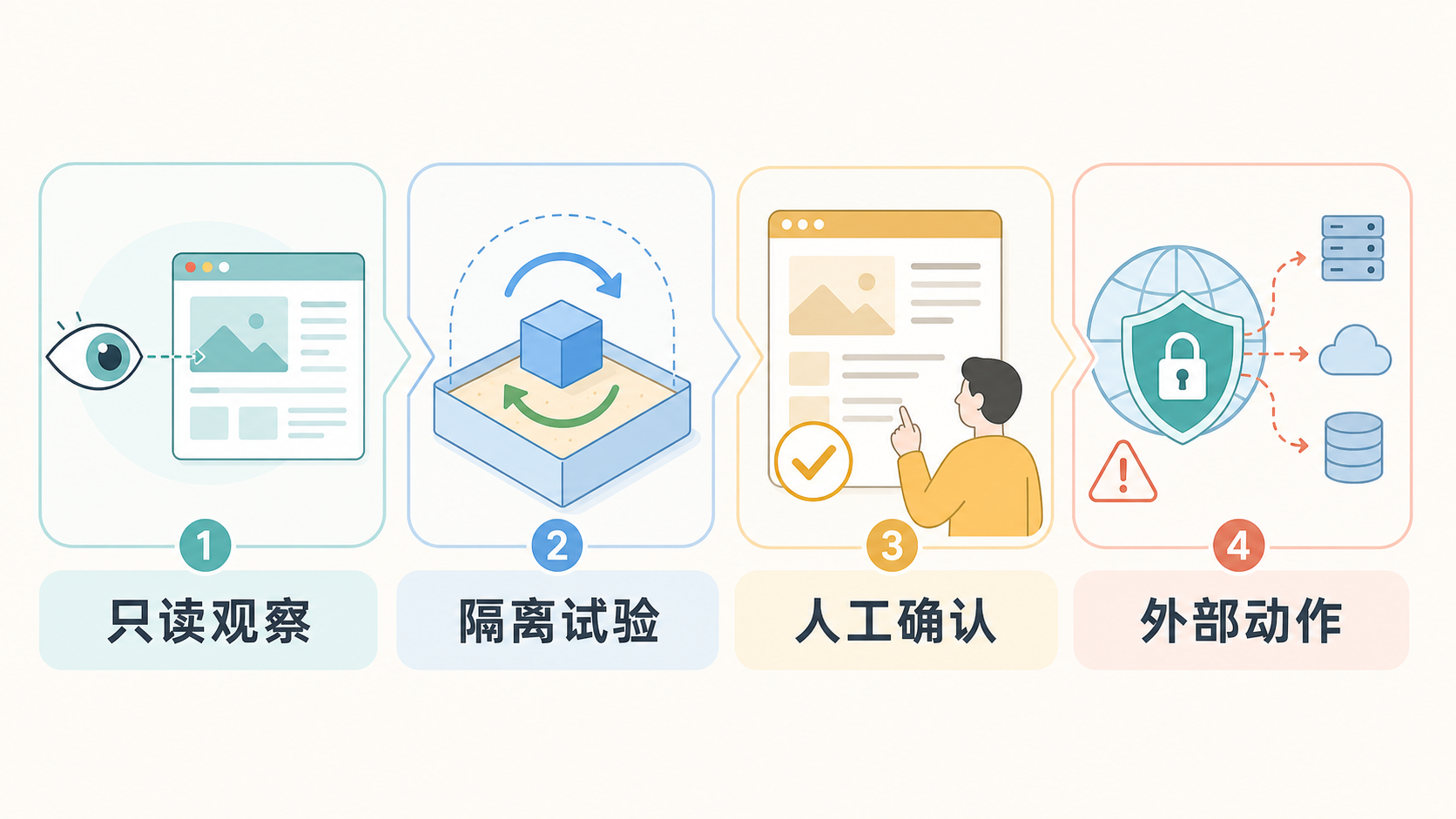
Read-only observation already has value. An agent can compare design files with staging screenshots, filter pages that fail visual regression, find anomalous numbers in a dashboard, or extract chart changes that need human confirmation. It does not need production login or write access.

Image source: DeepSeek V4-Flash-Vision-Exp release notes. The image illustrates vendor-described multimodal agent use cases, not an independent test of safety or effectiveness.
Next come reversible actions inside an isolated environment. Let the agent change layout in a temporary worktree, fill mock forms in a one-time test account, or run browser tests in a reset-able preview environment. The most important property at this stage is not speed. It is the ability to discard the environment, restore the data, and roll back the change when something is wrong.
After that comes a reviewed preview. The agent hands the change, screenshots, and test results to a developer or business reviewer. Design issues are judged by visual differences. Flow issues are judged by state transitions and copy. Permission-sensitive operations need the target account and scope of impact confirmed.
External actions come last. The agent can generate a release draft, fill a form that is waiting to be submitted, or write a migration plan and dry-run results. Before anything is actually sent, submitted, granted, or deleted, it stops and waits.
This is the same line as a reversibility acceptance checklist for coding agents: scope, snapshots, and rollback. Multimodal tasks simply add an acceptance surface that used to be less visible: screen state. A code diff tells you what changed. Snapshots and rollback tell you how to recover when something goes wrong. Interface evidence tells you what the user or operator finally saw.
Which tasks to try first
A low-risk pilot does not have to be a toy demo. Many everyday tasks are already suitable for controlled environments.
Visual regression triage is a good starting point. An agent compares a batch of screenshots with baselines and flags navigation misalignment, overflowing text, or missing buttons. A developer then confirms which ones are real issues. The time saved is the manual screening of images, and the agent does not touch user data directly.
Form and page-state checks also fit well. For example, in staging, walk through required-field messages, disabled states, empty-data pages, and error pages. Completion criteria can be concrete: which page states are covered, which screenshots are kept, and what structured result is returned on failure.
One often overlooked use is read-only inspection. Give an agent a restricted profile to look at monitoring dashboards, release admin pages, or documentation sites. If it finds an inconsistency, it can create an internal ticket, but it cannot change configuration, click publish, or read secrets. This uses visual understanding on interfaces that are hard to structure while keeping high-consequence actions outside the agent's reach.
The following tasks should not be handed over just because the model can understand them:
- Completing payments, refunds, purchases, or signing terms with real accounts;
- Adding permissions to users, services, or other agents;
- Handling pages that contain login credentials, identity documents, or private data;
- Publishing, deleting, migrating, or batch-changing anything in production;
- Uploading pages, screenshots, or tables outside the model and toolchain.
Their difficulty is usually not image recognition. It is authorization, data boundaries, and recovery cost. A model can help prepare and explain. The real action belongs in a stricter environment with auditing and human confirmation.
Seeing is only the beginning
This DeepSeek update lets agents understand more information that used to be trapped on the screen. Reading web pages, looking at design files, handling charts, and checking desktop state will take fewer detours.
But what a model understands and what it can do remain separate matters.
The model is responsible for understanding the screen and proposing the next step. Tool permissions decide whether it can click, type, upload, or call an external system. The acceptance system turns it says it is done into inspectable diffs, test results, interface states, and audit records. For actions that are irreversible, affect other people's rights, or change the state of the real world, a person still has to own the judgment.
Vision does not replace those steps. It pushes them forward. A mature multimodal agent workflow is not one where the model sees a button and presses it. It is one where the team can answer four questions: What did it see? What is it about to do? How do we prove the result is correct after it acts? If something goes wrong, can we get back?