RSS is one of those things many people have heard of, some people understand well, and plenty of others still find vague or confusing. That confusion is normal. It often starts as “What exactly is RSS?”, then turns into understanding how it works, then into actually using it well enough to appreciate how much effort it saves.
What matters most is this: RSS lets you follow updates from many different sites in one place, instead of opening each site again and again to check whether anything new has appeared.
What RSS actually is
RSS stands for Really Simple Syndication. It is a web standard used for publishing and subscribing to updates. In practice, a website provides a feed, and an RSS reader checks that feed regularly so you can see new content from all your subscriptions in one interface.
A simple way to think about it is this: an RSS feed is a plain text file in XML format that contains a site’s content or update information. When that site publishes something new, the XML file is updated as well. An RSS app then collects and manages many of these XML files, fetches changes on a schedule, and presents the updates as your subscriptions.
RSS is really an umbrella term for two different parts:
- The RSS source: the site, blog, news page, or other platform that publishes its updates in feed format.
- The RSS reader: the tool that subscribes to those feeds, monitors them for updates, and gives you one place to read everything.
The feed itself is an XML document, but RSS is not limited to a single exact format. There are several versions and related standards:
- RSS 2.0 is the most widely used version today, with broad support and many extensions.
- Atom is a more modern and flexible format with stronger extensibility and standards compatibility.
- RSS 0.91 and RSS 1.0 are older formats that appear much less often now.
For everyday use, these differences usually do not matter much. A decent RSS reader can subscribe to them without issue.
Using FreshRSS as a reader
There are many RSS readers available, but one practical example is FreshRSS.
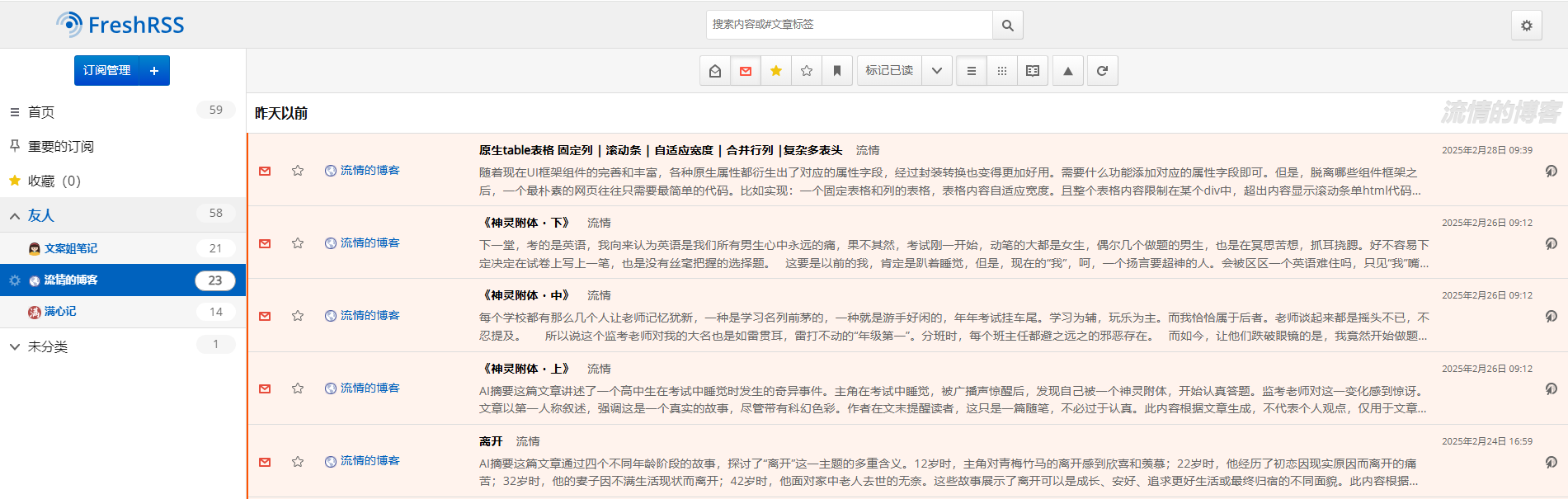
Its interface is fairly clean. Once you add the feeds you want to follow, the homepage lists the latest updates from those sources. You can read them directly inside the reader instead of opening each site one by one.
That alone is the core value of RSS: centralized reading, less repetition, and fewer wasted clicks.
Where Follow fits in
Here, “Follow” refers to follow.is, an RSS-based information browser. It was developed by DIYgod, the creator of RSSHub, and is positioned as a next-generation way to browse and manage information more efficiently.
It supports much more than traditional website feeds. Users can subscribe to RSS sources, social media accounts, podcasts, notifications, and other content streams, then combine them into a personalized information flow. It also handles multiple content types, including articles, videos, images, and audio.
Compared with something like FreshRSS, there is an obvious appeal: FreshRSS usually requires self-hosting, and its visual presentation is not always the most polished. Follow, by contrast, is much easier to start using.
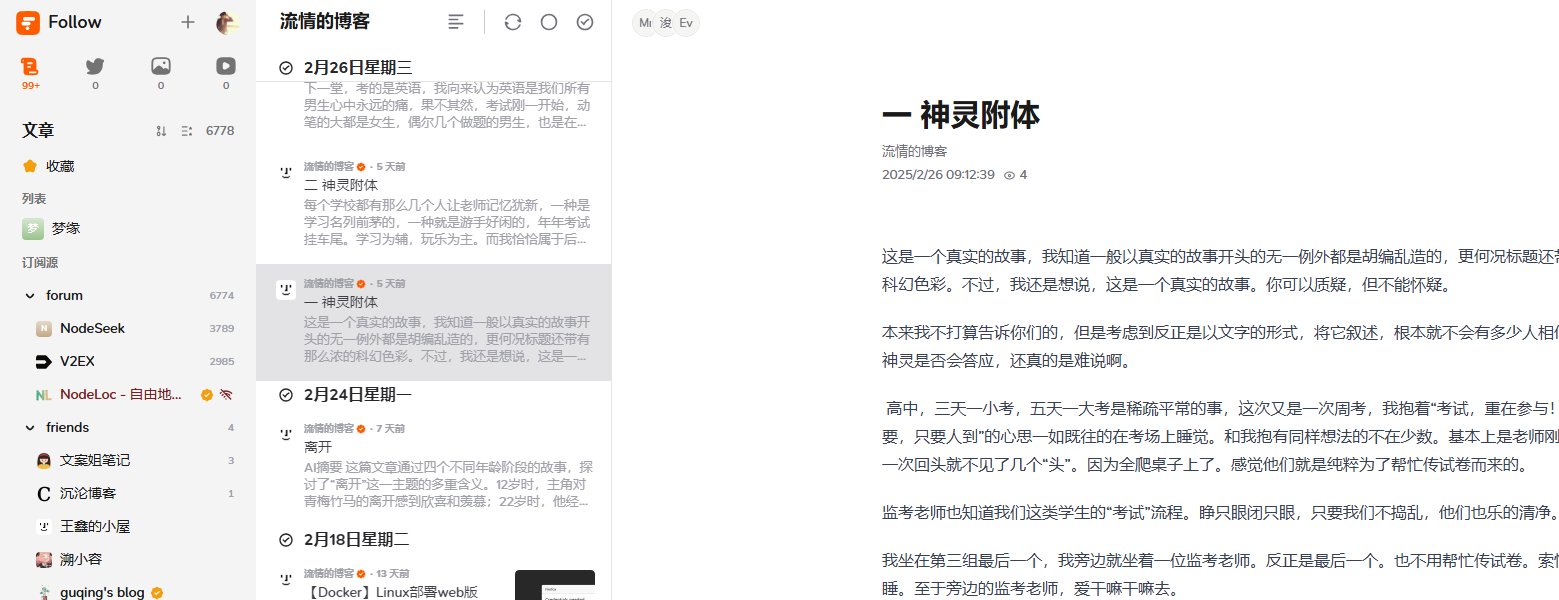
You register an account, add the sources you want, and start reading. That simplicity is a big reason many RSS users like it.
What Follow “Power” is for
Follow has a system called Power. The simplest way to understand it is as the platform’s points system, though it also has broader use inside its own ecosystem.
Power has three main functions.
1. Exchanging for invitation codes
On Follow, 100 Power can be exchanged for one invitation code.
Newly registered users can subscribe to only five sources. Unlimited subscriptions become available only after the account is activated with an invitation code.
2. Tipping other users
If someone publishes useful content or helps you in a meaningful way, you can use Power to tip them.
3. Cashing out
Power is not just an internal score. It is also tied to a token on the VSL blockchain, which means it can be withdrawn and potentially converted through blockchain-based C2C methods.
At the pricing mentioned here:
- 1 Rss3 = 19 Power
- 1 Rss3 = $0.094
That puts one Power at roughly 0.03 to 0.04 RMB, though the price fluctuates. Once you factor in the platform’s 20% fee and blockchain gas costs, small amounts are not especially worth the trouble. Without a very large balance—hundreds of thousands of Power—it is hard to justify treating it as something to cash out seriously.
How Power is obtained
There used to be claims that verifying your own feed would earn 100 Power, but that no longer seems to be the case.
In practice, the ways to get Power align closely with what it is used for:
- buy it through blockchain channels and deposit it,
- receive it from other users as tips,
- or earn it through the simplest method of all: daily check-ins.
The odd “conservation law” behind Follow’s Power
After observing the check-in system for more than ten days, a pattern becomes visible.
The amount of Power earned from check-ins appears to depend on two things:
- your level, and
- your activity.
Your activity can go up to 50 per day. Your level, meanwhile, seems to be tied to how much Power you already hold.
This creates a rather strange effect: users with higher levels earn more Power from checking in, and having more Power helps raise their level. In other words, the people with more Power are also in a better position to gain more of it.
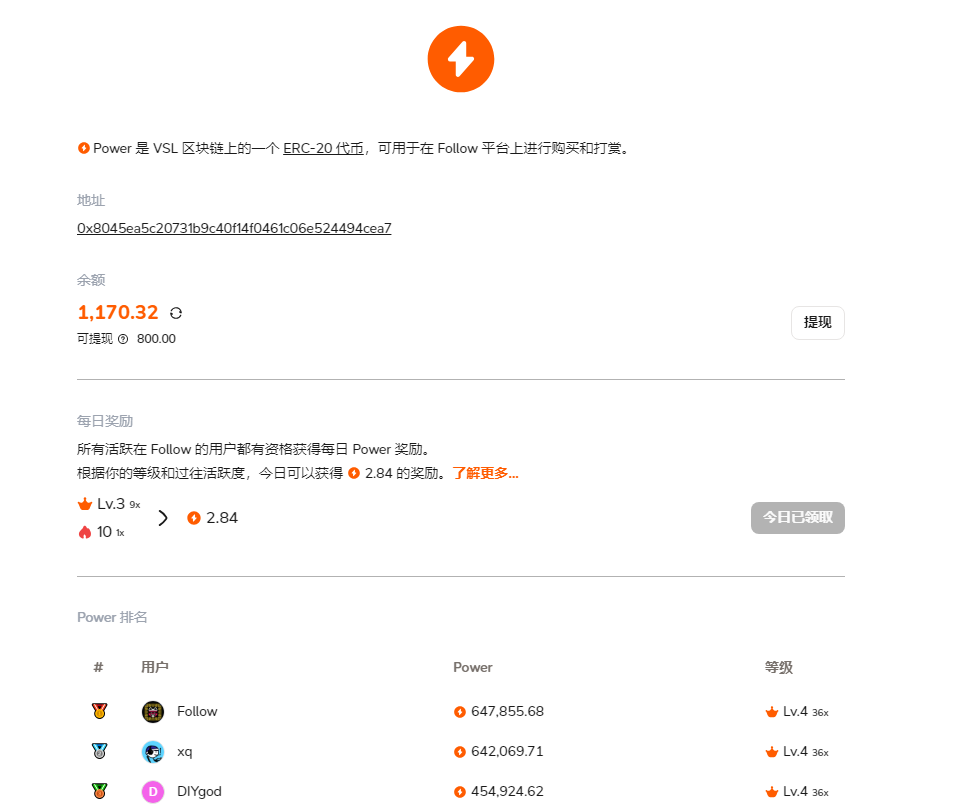
It sounds a bit absurd, but it is not entirely unlimited. Looking at the ranking data, accounts with 600,000 Power and 200,000 Power can both still be at Level 4, so at some point the gap does not keep widening in a simple linear way.
For a Level 1 user with activity maxed out at 50, daily check-in rewards are roughly 1 to 2 Power.
For a Level 3 user with full activity, the daily return has been around 14 to 15 Power, and even that has been slowly decreasing. One possible explanation is that the daily reward pool is fixed, while more and more users are reaching the same level and sharing it.
How activity increases
The activity system has a few observable rules:
- searching for a subscription source once: activity +6
- opening and reading one piece of content: activity +2
- reaching 100% reading progress on a piece of content: activity +4
Because of that, a practical approach is to subscribe to a few forum or community-style feeds that update frequently. When there is plenty of fresh content, it becomes easy to click through several items and fill your daily activity quickly.
How to check your own activity
If you are logged in, you can inspect your data on the ranking page:
https://api.follow.is/wallets/ranking
In that data:
- activityPoints represents your current activity,
- prevActivityPoints represents yesterday’s activity.
The daily cap is 50, so as long as activityPoints reaches or exceeds 50, you have effectively maxed out your activity for that day. The next day’s Power settlement is then calculated based on that value.
For anyone trying to make sense of RSS today, this leads to a fairly simple picture. RSS itself is still just a reliable way to collect updates from many places into one stream. FreshRSS represents the classic self-hosted route. Follow takes that idea further with a more polished and broader information experience—but also adds a platform economy of levels, activity, invitations, and Power that changes how people use it.