I put together a small JavaScript widget that lets you select text from an article, add it to a keyword list, and highlight every matching occurrence in red.
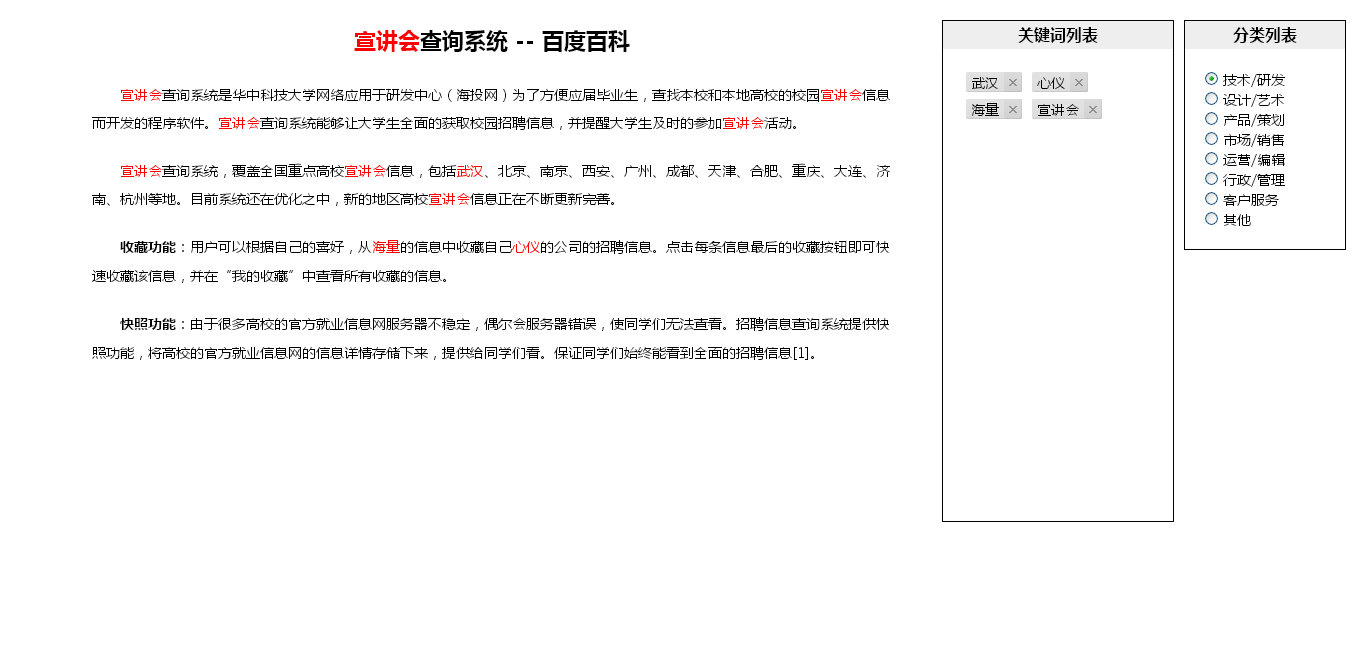
There was a demo for it, and although the feature itself is simple, it ended up using a lot of the little things that come up often in day-to-day JavaScript work, so it is worth walking through.
The code
var GetKeywords = {
  str: "",
  limit: 11,
  keywords:[],

init : function(){
    var box = this._(“article”),
      _this = this;
//获取已经存在的关键词 this.getAllKeyWord();
//让rmKeyWord函数全局化 window.rmkeyWord = this.rmkeyWord;
//取词事件 box.onmouseup = function(evt){ var evt = evt || window.event, target = evt.target || evt.srcElement;
//如果鼠标是在button上弹起,则忽略 if(target.id == "btn") return; GetKeywords.str = _this.getSelectionText();
if(this.str.length == 0) return; if(_this.("btn")) { _this.removeBtn(); if(GetKeywords.str == "") return; _this.createBtn(evt); return; } _this.createBtn(evt); }
},


//工具函数
  _: function(obj){
    return document.getElementById(obj);
  },


//获取选中文本
  getSelectionText: function(){
    if(window.getSelection) {
      return window.getSelection().toString();
    } else if(document.selection && document.selection.createRange) {
      return document.selection.createRange().text;
    }
    return ‘’;
  },


//创建按钮
  createBtn: function(evt){
    var button = document.createElement(“div”),
      evt = evt || window.event,
      x = evt.pageX || evt.x,
      y = evt.pageY || evt.y,
      i, j, len,
      cssList = “”,
      _this = this,
      csses = {
        “height” : “30px”,
        “line-height” : “30px”,
        “position”: “absolute”,
        “top”: y + 10 + “px”,
        “left”: x + 10 + “px”,
        “cursor”: “pointer”,
        “border”: “1px solid #000”,
        “background”: “#EEE”,
        “padding”: “2px 8px”,
        “border-radius”: “3px”
      };
    for(i in csses){
      if(csses.hasOwnProperty(i)){
        cssList += i + “:” + csses[i] + “;”;
      }
    }
    button.style.cssText = cssList;
    button.innerHTML = “添加到关键词列表”;
    button.setAttribute(“id”, “btn”);
this._("article").appendChild(button);
button.onclick = function(){ if(_this.str.length > _this.limit){ alert("关键词长度最长为11,可以通过设置GetKeywords.limit来控制长度。"); _this.removeBtn(); return; }
for(j = 0, len = GetKeywords.keywords.length; j < len; j++){ if(GetKeywords.keywords[j] == _this.str){ alert("已经存在该关键词了~"); _this.removeBtn(); return; } continue; } _this.keywords.push(_this.str); _this.setRed(_this.str); _this.addTo(); _this.removeBtn(); };
},


//删除按钮
  removeBtn: function(){
    var btn = this._(“btn”);
    btn.parentNode.removeChild(btn);
  },


//加入到关键词里列表
  addTo: function(){
    var word = this._(“wordList”);
    word.innerHTML += “<span><font>” + this.str + “</font><a href=’#’ onclick=’rmkeyWord(this);’></a></span>”;
  },


//关键词标红
  setRed: function(str){
    var content = this._(“article”),
      temp = ‘(‘ + str + ‘)’;
      reg = new RegExp(temp,’g’);
content.innerHTML = content.innerHTML.replace(reg, "<span style='color:red;'>$1</span>");
},


//删除标红
  rmRed: function(str){
    var content = this._(“article”),
      temp = “(<span[^<]*” + str + “</span>)”;
      reg = new RegExp(temp,’gi’);
    content.innerHTML = content.innerHTML.replace(reg, str);
  },


//获取已经存在的关键词(也可以用来获取所有关键词)
  getAllKeyWord: function (){
    var spans = this._(“wordList”).getElementsByTagName(“span”),
      key = [], i = 0, len;
    for(len = spans.length; i < len; i++){
      var font = spans[i].getElementsByTagName(“font”)[0];
      var temp = font.innerText || font.textContent;
      this.setRed(temp);
      key.push(temp);
    }
    this.keywords = key;
  },


//删除关键词
  rmkeyWord: function (obj){
    var target = obj.parentNode,
      word = obj.previousSibling.innerHTML,
      i = 0, len;
    GetKeywords.rmRed(word);
    for(len = GetKeywords.keywords.length; i < len; i++){
      if(GetKeywords.keywords[i] == word){
        GetKeywords.keywords.splice(i,i);
      }
      continue;
    }
    target.parentNode.removeChild(target);
    return;
  }
}


GetKeywords.init();
That is the full JavaScript. It is a bit long, so the more interesting parts are easier to discuss separately.
Selecting text from the page
getSelectionText: function(){ if(window.getSelection) { return window.getSelection().toString(); } else if(document.selection && document.selection.createRange) { return document.selection.createRange().text; } return ''; }
The idea here is straightforward: use window.getSelection() in modern browsers, and fall back to document.selection.createRange().text for older IE.
Building the floating control button
createBtn: function(evt){ var button = document.createElement("div"), //... csses = { "height" : "30px", "line-height" : "30px", "position": "absolute", "top": y + 10 + "px", "left": x + 10 + "px", "cursor": "pointer", "border": "1px solid #000", "background": "#EEE", "padding": "2px 8px", "border-radius": "3px" }; for(i in csses){ if(csses.hasOwnProperty(i)){ cssList += i + ":" + csses[i] + ";"; } } button.style.cssText = cssList; button.innerHTML = "添加到关键词列表"; button.setAttribute("id", "btn"); //... }
One practical detail here is how the styles are applied. When JavaScript frequently needs to manipulate DOM styles, it is sometimes convenient to avoid adding another CSS file and instead store the styles in an object, then write them out with a for...in loop.
At first, the styles were assigned like this:
obj.style[i] = csses[i];
For some reason that triggered errors in IE, so cssText was used instead.
The result looks like this:
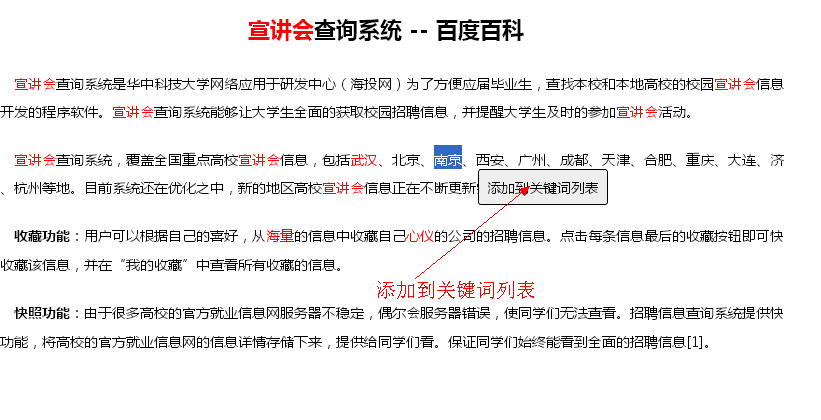
When the user selects text and releases the mouse, this small control appears near the cursor. Clicking it tries to add the selected text into the keyword list.
There are two checks before that happens:
- the keyword cannot be longer than 11 characters, controlled by
GetKeywords.limit - duplicate keywords are rejected
If either condition fails, the code shows an alert and removes the temporary button.
Highlighting keywords in red
//关键词标红 setRed: function(str){ var content = this._("article"), temp = '(' + str + ')'; reg = new RegExp(temp,'g'); content.innerHTML = content.innerHTML.replace(reg, "<span>$1</span>"); }
This part is mainly about regular expressions. The selected keyword is wrapped as a capture group, then every match is replaced with a span. The $1 refers to the first captured group, which is the matched keyword itself.
Removing the highlight works in a similar way:
//删除标红 rmRed: function(str){ var content = this._("article"), temp = "(<span[^<]*" +="" str="" "<="" span=">")"; reg = new RegExp(temp,'gi'); content.innerHTML = content.innerHTML.replace(reg, str); }
There was also a browser-specific issue here. After the code was written, a bug turned up in IE: if the regex flag in rmRed was only 'g', the function seemed to stop working. Inspecting innerHTML in the IE8 console showed that the tags had been converted to uppercase, so the flag had to be changed to 'gi'.
Reading existing keywords and removing them
//获取已经存在的关键词(也可以用来获取所有关键词) getAllKeyWord: function (){ //... }, //删除关键词 rmkeyWord: function (obj){ //... GetKeywords.rmRed(word); for(len = GetKeywords.keywords.length; i < len; i++){ if(GetKeywords.keywords[i] == word){ GetKeywords.keywords.splice(i,i); } continue; } //... }
On initialization, the script reads any keywords that already exist in the list, highlights them in the article, and stores them in the keywords array.
The delete logic removes both the list item and the matching highlight from the article content.
One unresolved oddity was that using this.keywords inside that call path did not work as expected, while switching to GetKeywords.keywords did. The exact reason was still unclear at that point and needed more digging.
Initialization flow
GetKeywords.init();
init() is the entry point for the whole feature. It first fetches any existing keywords, applies red highlighting to them, and then binds the onmouseup event so selected text can be captured.
The overall interaction is simple:
- select a word or phrase inside the article
- release the mouse
- a small button appears
- click it to add the selected text to the keyword list
- every occurrence of that keyword in the article turns red
- remove a keyword from the list to clear its highlight
The AJAX portion still had not been written, so the next step was to send the keywords to the backend once the front-end behavior was finished.
Even for a small utility like this, it took some effort to get the details working, and testing still exposed quite a few bugs. It was a useful reminder that the basic idea can be easy, but edge cases—especially browser quirks—take much more care.